

Account, services and billing
Direct debit
Direct debit lets you pay for services and renewals automatically, with charges taken directly from your bank account through what are known as SEPA mandates.
Automatic collection depends on the mandate, each service's settings and the status of the proforma invoice. Check the first charge date before relying on this method for an upcoming due date.
When you add the account, all your services are charged to it without any further setup. If you prefer, you can decide service by service: leave some on automatic collection and pay others by hand with card, Bizum, PayPal or bank transfer.
Set up a new bank account
To turn it on, go to the client area, Billing section, Direct debits subsection, and click Add bank account. The payment gateway will open so you can enter the account details.
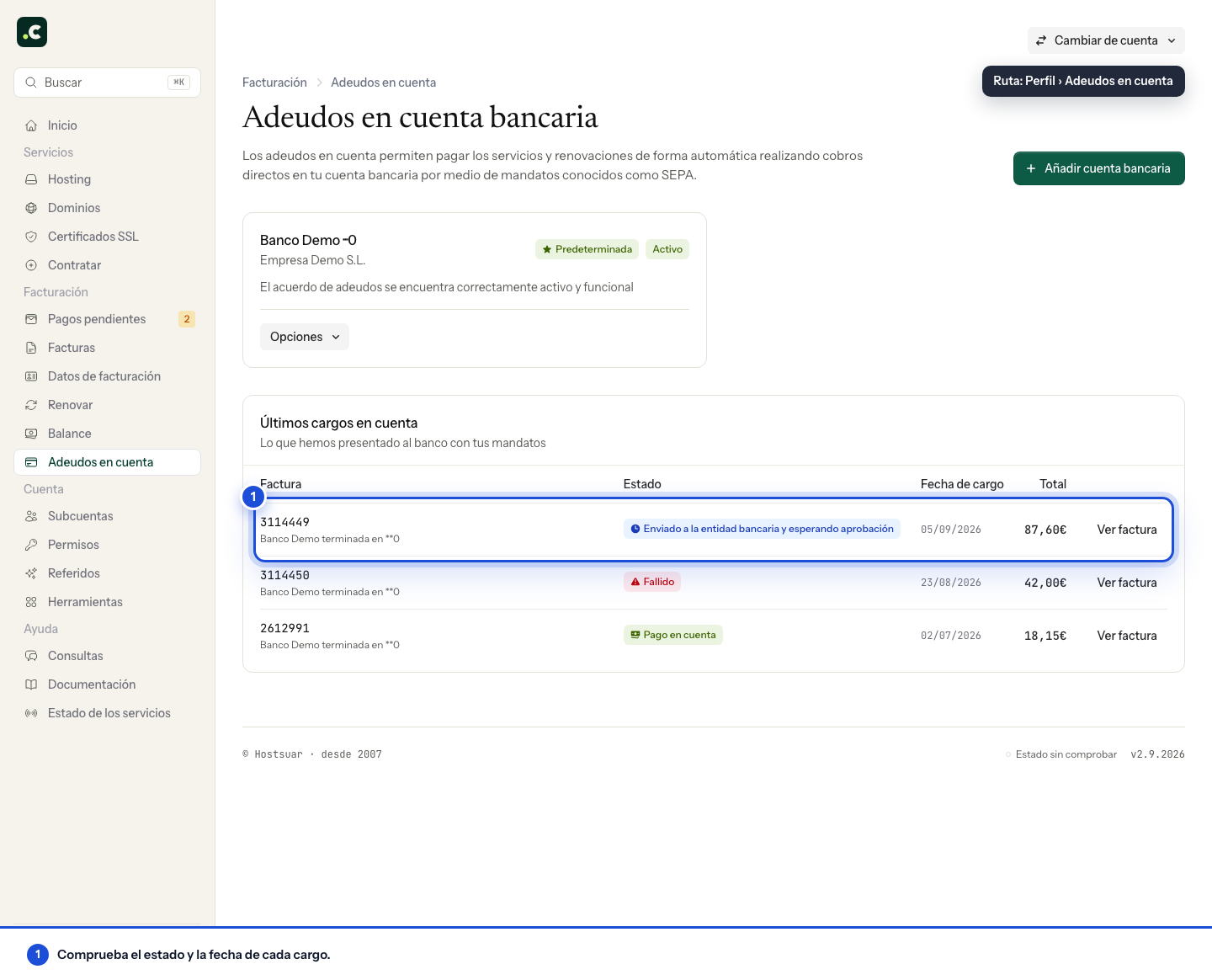
Once the process is complete, the mandate appears as a card with its bank, account holder and status. It may stay pending for several working days: charges will start automatically once the bank has validated it and the banking platform gives a first available charge date. Below, Latest direct debits shows what we have submitted to the bank with your mandates, with its status and date.
The first account you add becomes the default, and renewals for all your services are charged to it. You do not have to choose it on each service: you only need to open a service if it has another payment method set explicitly (Do not use direct debit for this service) or if you want to charge it to another account.
Set up several bank accounts to charge by service
You can set up several different bank accounts following the same process, so you can choose which account each service's renewal is charged to.
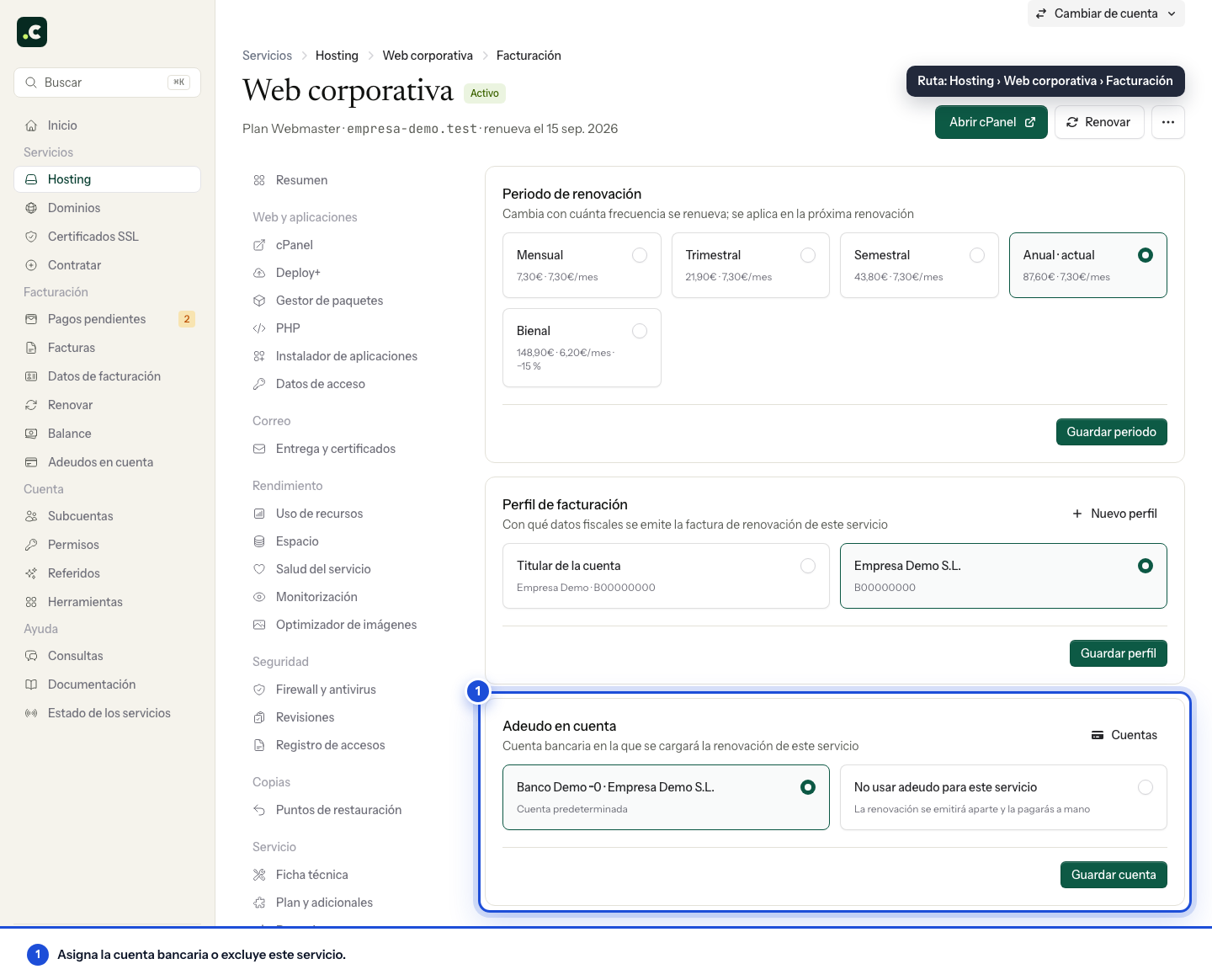
To link a bank account to a specific service, open its page and go to its billing section: Service billing for a hosting plan, Period and billing for a domain and Billing details for an SSL certificate. There you will find the Direct debit card, where you choose which account that service's renewal is charged to. Save with Save account.
The options include Default account, each of your configured accounts and Do not use direct debit for this service. With the last one, the service is excluded from automatic payments and its renewal will be issued separately, to be paid by hand.
Selective payment: exclude services from direct debit
Selective payment lets you decide, service by service, which are charged automatically by direct debit and which you prefer to handle by hand.
This option is especially useful when:
- You want to keep some services on automatic payment but handle others manually
- You prefer to use different payment methods for specific services
- You need to control the dates of certain payments
Services excluded from direct debit will keep working as normal, but their renewal proforma invoices will be generated as pending, so you can pay them manually before the deadline by card, Bizum, PayPal or bank transfer.
What happens to payments that are already pending
Activating a bank account does not necessarily change every payment issued before. A pending proforma invoice will be sent for direct debit when it shows Direct debit as the payment method, contains no excluded services and the mandate already allows charges.
Validating the mandate and the first possible charge date can take several working days. Check the proforma invoice's method and status in Billing > Pending payments. If it is still set to manual payment, you can pay it with another method or contact us to check whether it can still be processed by direct debit.
Do not also make a manual payment when a bank charge is already in progress, because two operations could be started for the same proforma invoice.
What happens if the bank rejects a charge
When the bank rejects a debit, the proforma invoice becomes pending again. The rejection does not by itself trigger an automatic notice to the client, so it is worth checking the status in Billing > Direct debits. If the bank gives a reason, we can use it to decide the next step. You can choose to:
- Ask for a new attempt after sorting out the problem with your bank.
- Change or update the bank account and assign it to the service.
- Cancel the direct debit and pay by card, Bizum, PayPal or transfer.
We do not retry a charge without confirmation. Before asking for another attempt, check with your bank that there are enough funds, that the mandate is not blocked and that it will not reject it again. Each attempt costs Hostsuar money and, if rejections keep happening, we will not be able to keep direct debit active on the account. Return fees are not passed on to the client.
Set the default bank account
The default bank account is the one used for services that do not have a specific account set. To change it, click Make default on the card of the account you want as the default; the button only appears on accounts that are not the default yet. Choosing it moves the mandate for every service that uses the default.
Delete a bank account
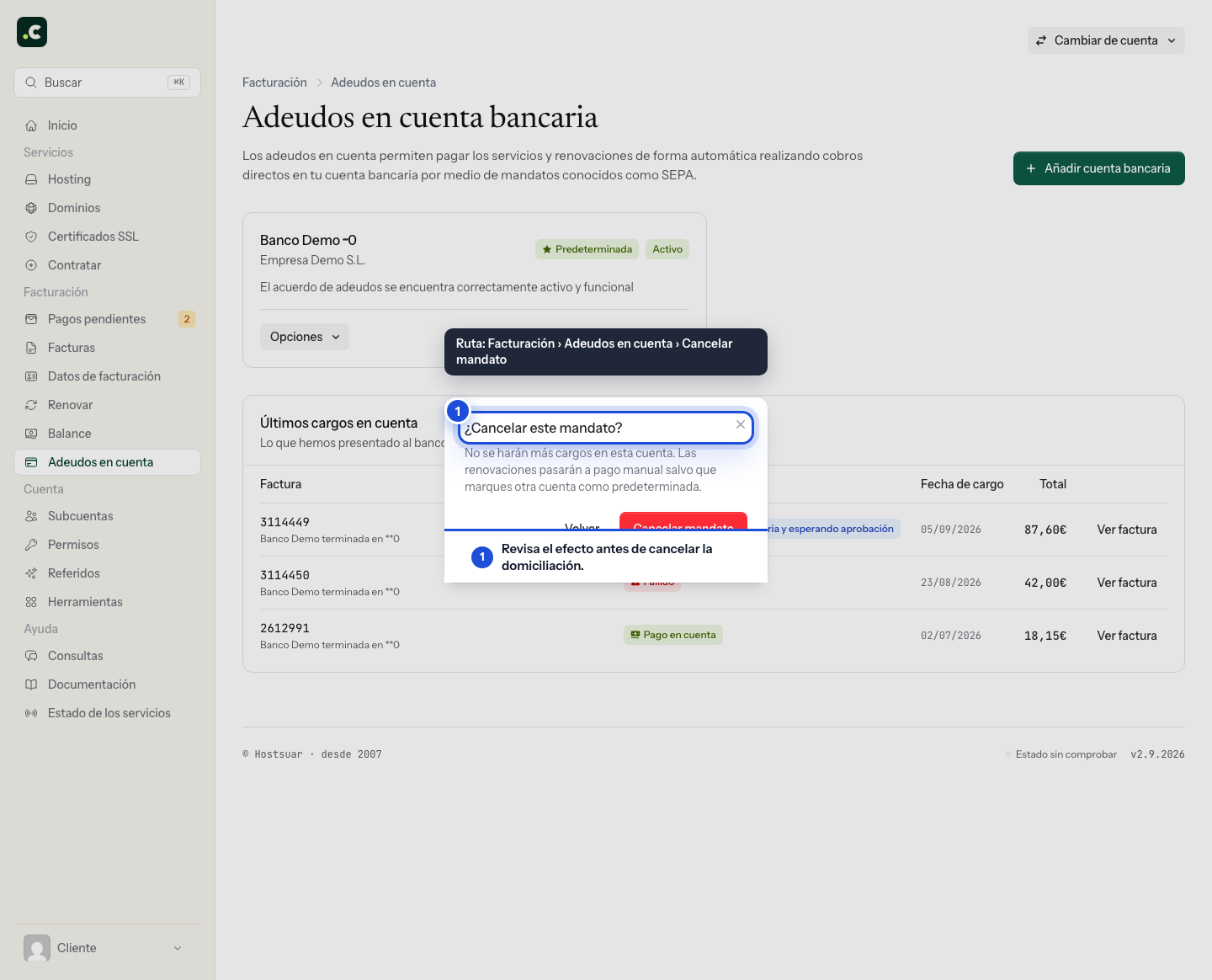
To delete or deactivate a bank account, open Options on its card, choose Cancel mandate and confirm. Check the confirmation and review the account assigned to each service for its upcoming renewals. Cancelling the mandate does not guarantee stopping a charge that has already been sent to the bank. If one is in progress, ask us before paying it another way. Do not assume that choosing another default account changes every service with a specific assignment.
You may also find useful
- Add and check account credit in the client area Generate a proforma invoice to add credit, check when it becomes available and decide how to apply i...
- Available payment methods Lists the ways to pay and explains the current restrictions on Bizum, PayPal and direct debit.
- Review and complete an order Check the basket contents, billing profile, payment, contracts, discounts and total before confirmin...
- What to check if a card payment fails The useful checks when a card payment is declined, and how to avoid duplicate charges and choose ano...
Something wrong or out of date? Tell us and we will review it.