

Account, services and billing
Choose the default payment method
From the client area, in Billing > Pending payments > Preferences > Default payment method, you can set the method that will appear initially on new proforma invoices.
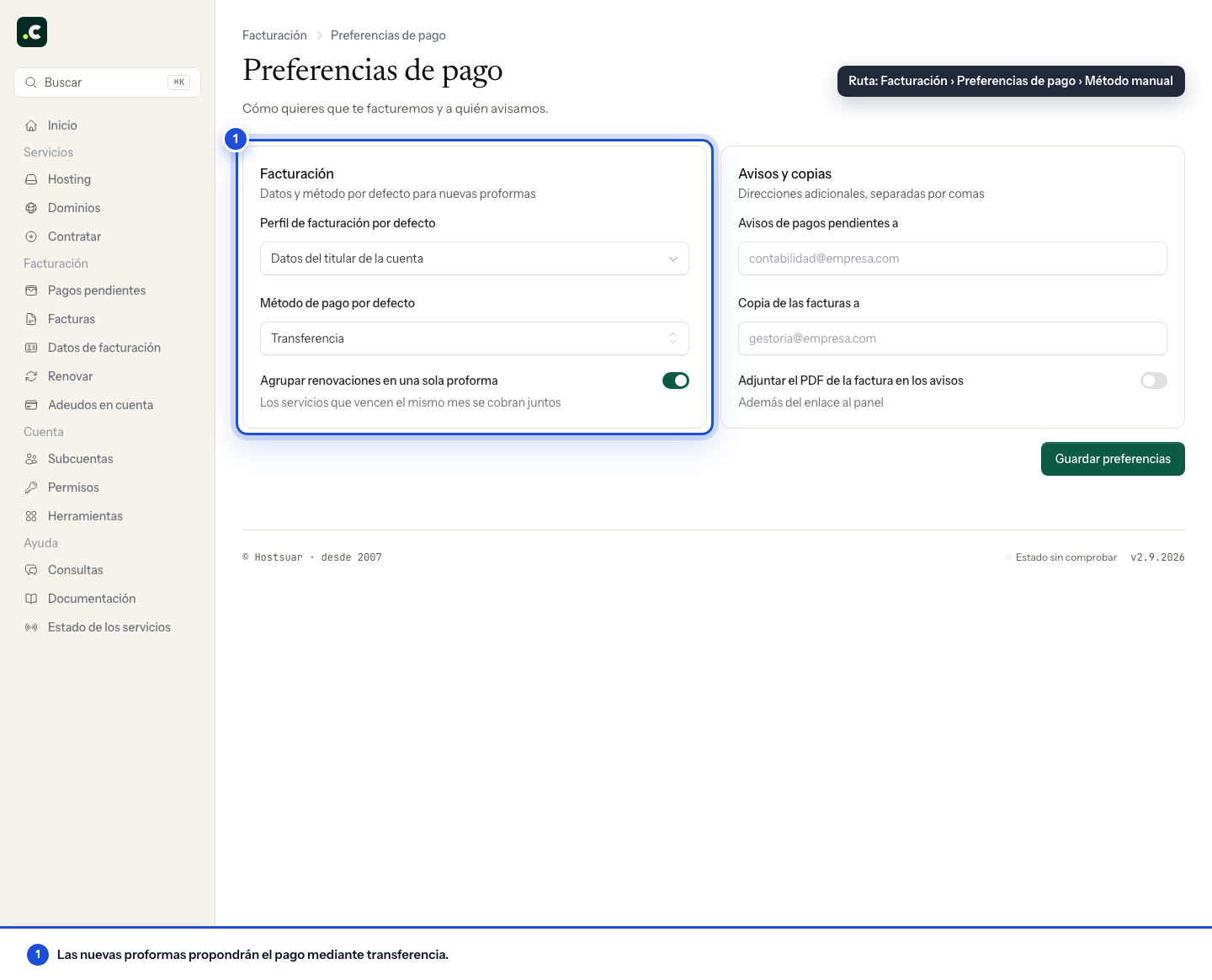
New proforma invoices will use this preference when the method is available for that payment.
This does not mean the proforma invoice is paid automatically. Card, Bizum, PayPal and bank transfer require you to go to the client area and make the payment. Direct debits are handled separately through the mandate and the bank account assigned to each service.
Click Save preferences. The selection applies to new proforma invoices when they meet the method's conditions; review the ones already created separately.
If you have an active direct debit, the screen shows Payment method: direct debit instead of the selector. To exclude a service from automatic collection or change its bank account, use its billing section and check whether it has a charge already in progress.
You may also find useful
- Add and check account credit in the client area Generate a proforma invoice to add credit, check when it becomes available and decide how to apply i...
- How to pay a pending proforma invoice How to find a pending proforma invoice, review its breakdown and choose in the client area how you w...
- Review and complete an order Check the basket contents, billing profile, payment, contracts, discounts and total before confirmin...
- What to check if a card payment fails The useful checks when a card payment is declined, and how to avoid duplicate charges and choose ano...
Something wrong or out of date? Tell us and we will review it.