

Domains and DNS
Get a domain's Auth-code
The Auth-code, EPP or authorisation code lets you start transferring a domain to another registrar. You request it from the provider that currently manages the domain.
Get it from Hostsuar
- Log in to the client area.
- Go to Domains.
- Click Manage on the domain.
- In the side menu of the domain page, under the Security group, open Protection and transfers.
- On the Authorisation code card, click Get auth code.
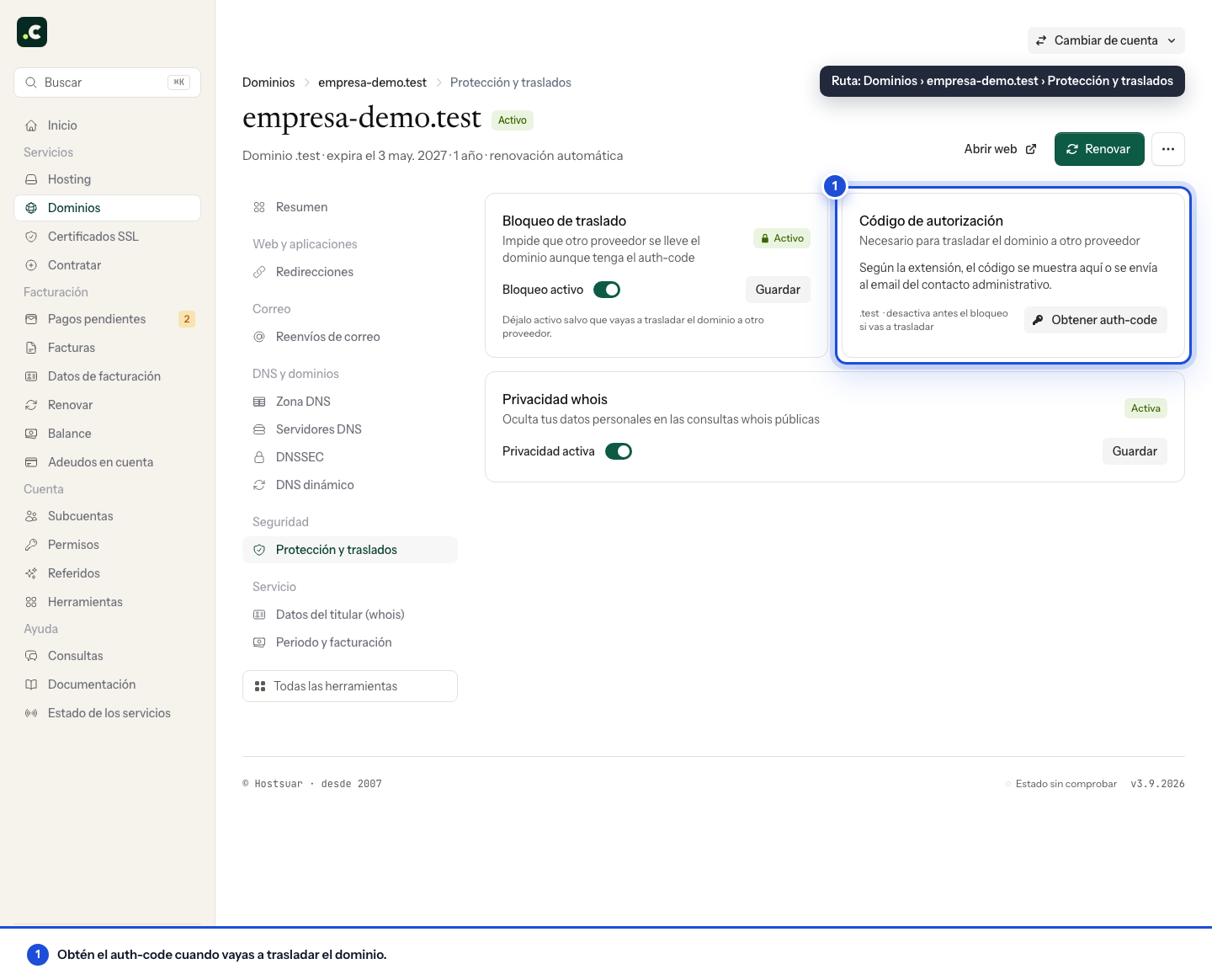
Depending on the extension and the registrar, the code is shown on screen or sent to the domain's contact address. If it's sent by email, check your spam folder too.
If you don't have access to that address, first review the domain's contact details.
Before you use it
- Turn off the transfer lock if the extension offers this option.
- Confirm that the domain isn't under a temporary registry restriction.
- Enter the code only in the new provider's secure form.
- Don't send it in an email or paste it into a ticket.
Some extensions use a different procedure and don't show the Auth-code option. For a .es domain managed by Hostsuar, request it from support and then follow the specific Red.es transfer and confirmation process.
If it doesn't arrive or doesn't work
Check:
- That you are looking at the right contact address.
- That it hasn't been filtered as spam.
- That you are using the most recent code.
- That you haven't copied extra spaces.
- That the domain is unlocked.
- That no other transfer is in progress.
If you generate a new code, the previous one may stop working. See what the Auth-code is and why it may be rejected.
The website and email don't move
Requesting the Auth-code doesn't change the DNS or move the hosting. The domain keeps using its current configuration until someone changes it or the previous provider withdraws its services.
Review access and exposure
If a sub-account can see the domain but can't request the code, review its transfer permissions; seeing a service doesn't grant all its actions. Availability also depends on the extension and the domain's status.
Request the code when you are ready to start the transfer. Don't include it in screenshots or store it in a public folder of the website. If it's exposed, ask the registrar to invalidate or replace it and review any open requests.
You may also find useful
- Check or restart a domain transfer Read the progress of a transfer, update its status and restart it safely when the registry reports a...
- What is a domain's Auth-code? What the Auth-code, EPP or authorisation code is, when you need it and what to do if the transfer co...
- Transfer .es, .com.es, .nom.es and .org.es domains How to transfer a domain regulated by Red.es, get the authorisation code and accept the request at d...
- Transfer a .com, .net, .org or other generic domain Requirements and steps to transfer a generic domain to Hostsuar: unlocking, Auth-code, confirmation...
Something wrong or out of date? Tell us and we will review it.