

Domains and DNS
Domain locked for transfer: causes and solution
The transfer lock protects a domain so that it can't be moved to another registrar without first turning off that security measure.
If a request says that the domain transfer is locked, check both the protection you can configure in the panel and any temporary restrictions from the registry. They are different controls.
Turn it off at Hostsuar
- Log in to the client area.
- Go to Domains.
- Click Manage on the domain.
- In the side menu of the domain page, under the Security group, open Protection and transfers.
- On the Transfer lock card, turn off the switch and click Save.
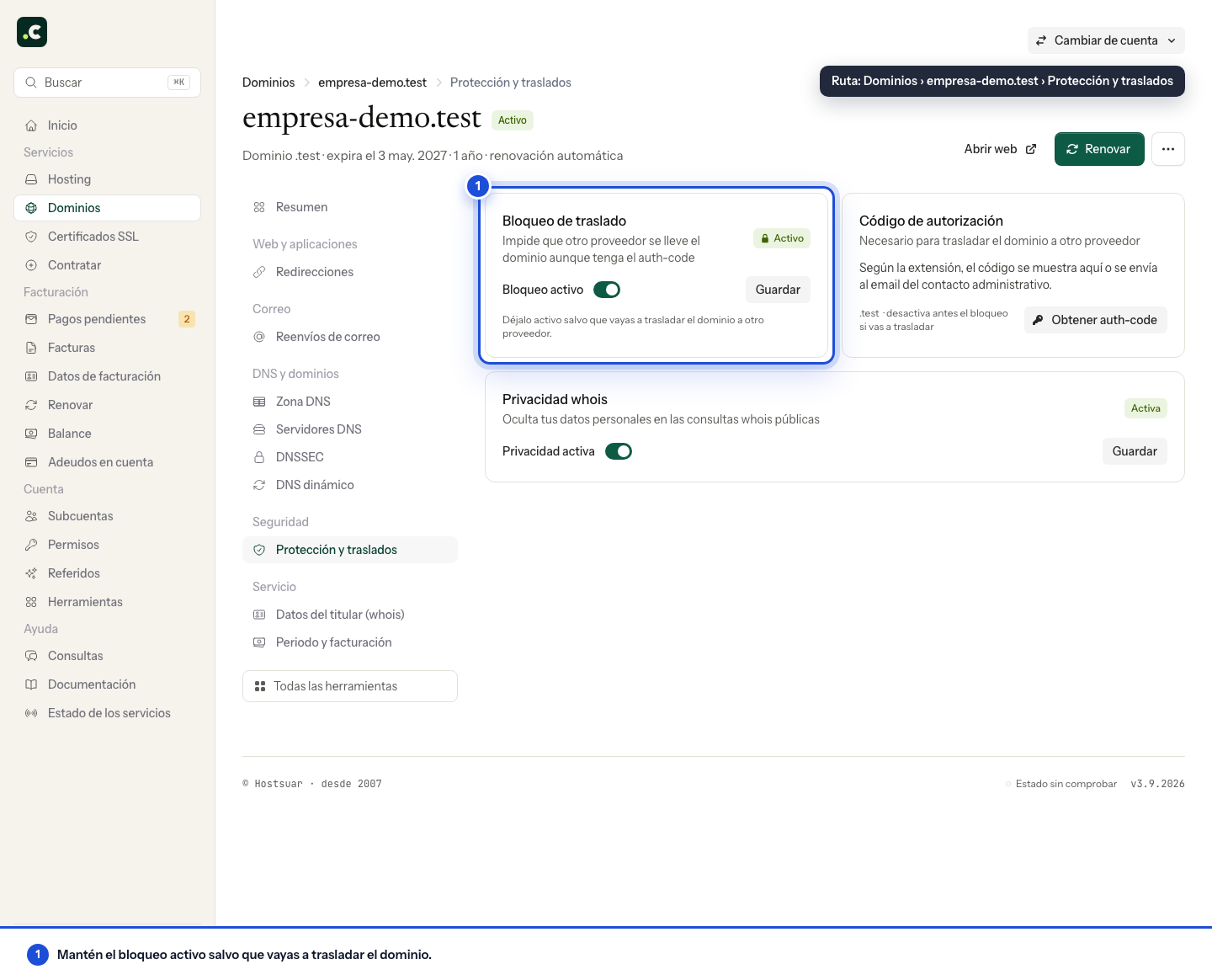
Only turn it off when you are about to start a transfer. If the domain is staying with the same registrar, keep the protection on.
If the option doesn't appear
Not every extension offers this protection. For some domains, such as .es, the panel may show it as unavailable or "prohibited" because the registry uses a different procedure.
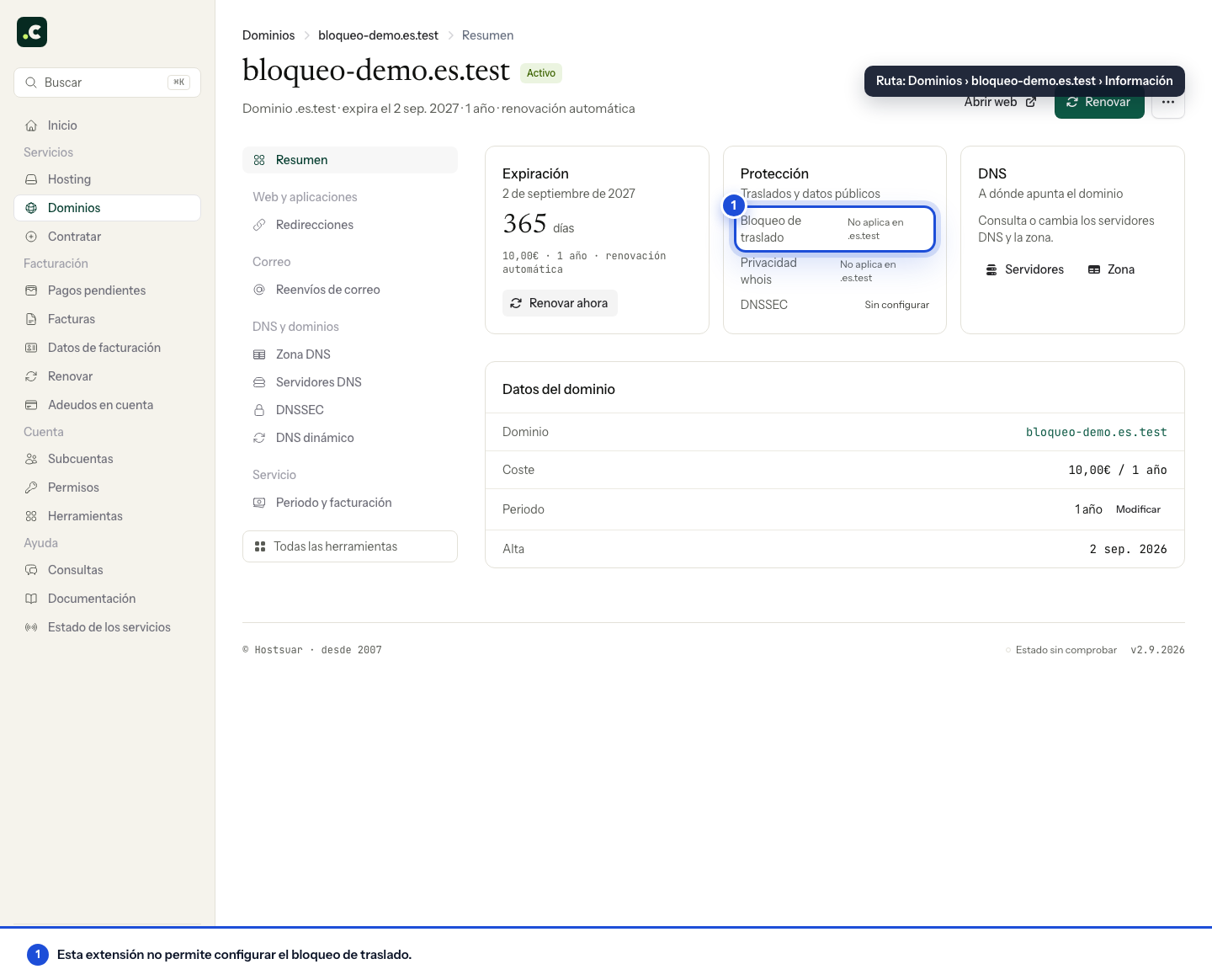
The absence of a switch doesn't necessarily mean the domain is locked: follow the specific guide for its extension.
Why it may still be locked
Even with the panel protection turned off, the transfer may be rejected if:
- The registry applies a temporary restriction after registration or a recent transfer.
- The registrant details were changed recently and the extension imposes a security period.
- The domain has expired or is in a phase that doesn't allow transfers.
- Another transfer is in progress.
- The change hasn't yet been synchronised with the registry.
An incorrect Auth-code also prevents a transfer, but it's a different cause from the lock. These restrictions are not removed by turning the switch on and off again. Ask the current registrar which specific status is blocking the transfer.
The panel shows unlocked, but the transfer is still locked
The lock change may take a while to synchronise with the registry. If you have just turned it off:
- Confirm that the panel still shows the protection as disabled.
- Wait for the registrar to reflect the change before sending repeated requests.
- Check that no earlier transfer is still open.
- Make sure the domain isn't under a temporary restriction.
- Use the current Auth-code when you start a new request.
Retrying over and over doesn't remove a restriction and can leave several requests pending. If the status doesn't change, ask the current registrar for the exact reason for the lock.
Before you retry
- Confirm that the domain is listed as active.
- Check that it isn't within a restriction period.
- Make sure the protection is turned off.
- Request the most recent Auth-code.
- Make sure no other request is open.
- Retry the transfer from the secure form.
If the domain has expired, see how to recover an expired domain before trying to transfer it.
Read the registry status
A status such as clientTransferProhibited indicates a restriction applied by the registrar; serverTransferProhibited comes from the registry and may need a different intervention. Give the exact status when you ask about the case, without sending the Auth-code.
If you turned off the protection and in the end you are not transferring, turn it back on and check the result. Review the sub-account's permissions if you can see the domain but the action to change its security doesn't appear.
You may also find useful
- How to transfer a domain to Hostsuar Requirements and steps to transfer a domain to Hostsuar without losing your website, email or DNS co...
- Transfer .es, .com.es, .nom.es and .org.es domains How to transfer a domain regulated by Red.es, get the authorisation code and accept the request at d...
- Transfer a .com, .net, .org or other generic domain Requirements and steps to transfer a generic domain to Hostsuar: unlocking, Auth-code, confirmation...
- What is a domain's Auth-code? What the Auth-code, EPP or authorisation code is, when you need it and what to do if the transfer co...
Something wrong or out of date? Tell us and we will review it.