

Account, services and billing
Default billing details
In the client area, under Billing > Pending payments > Preferences > Default billing profile, you can choose a profile you have created or use the account's main details. This selection initially applies to new proforma invoices that have no other profile assigned.
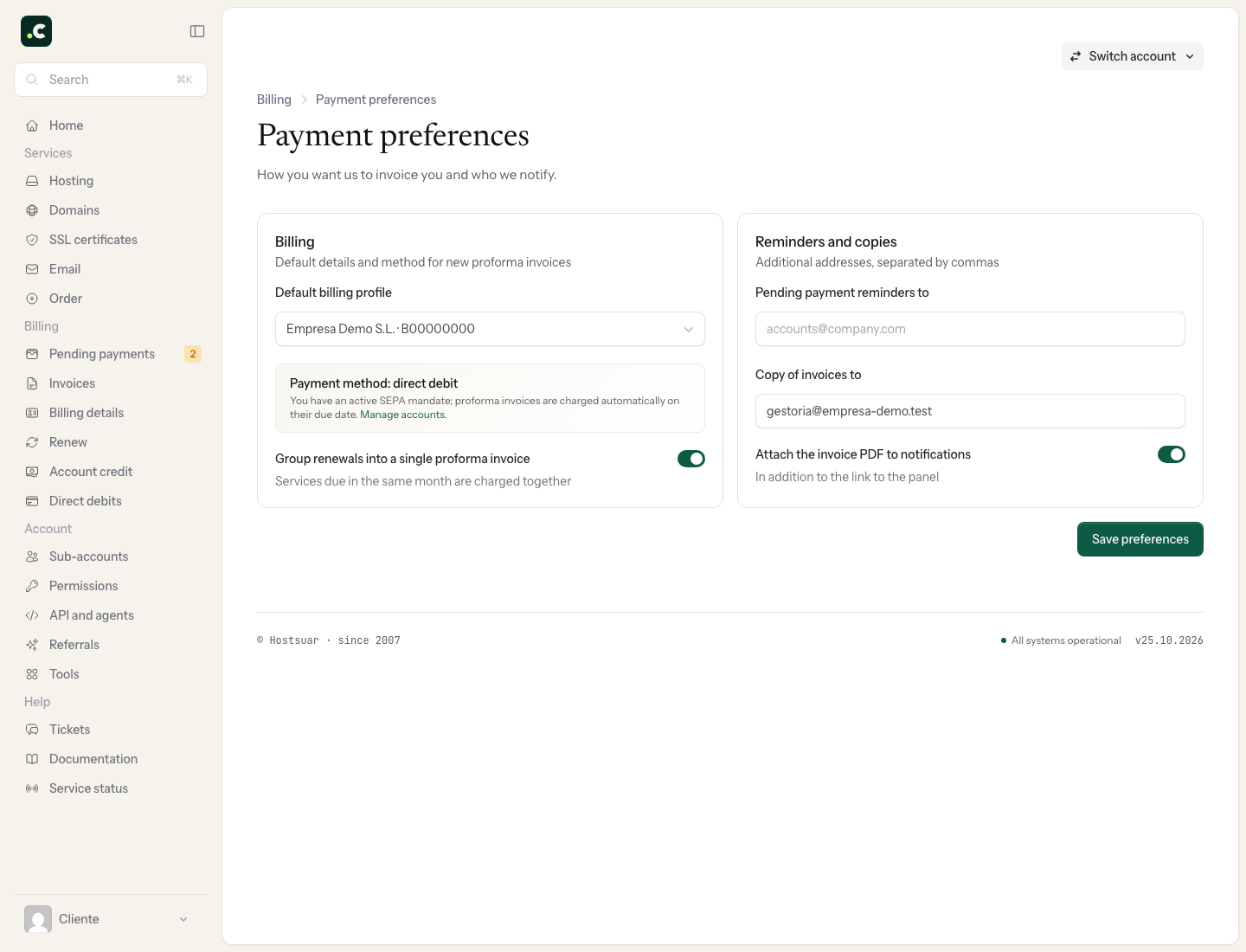
Remember that you can also set the billing details for each service. The service's own assignment takes precedence when its proforma invoice is generated. If you later merge several proforma invoices, the resulting one uses the account's default profile; check its details before paying it.
Click Save preferences and check the selected profile when you open the screen again. If you need another recipient, first create the profile from Billing > Billing details.
Changing the default does not correct every existing proforma invoice or any issued invoice. Open each document that needs a correction and check whether its details can be edited before paying it.
You may also find useful
- Assign a billing profile to a service Explains how to link a hosting service or domain to a specific profile so that future proforma invoi...
- Billing and payment preferences Summarises the settings available for profile and payment method, reminders and email copies, PDF at...
- Billing profiles Describes what profiles with third-party details are for, how to create several and when to apply th...
- Privacy and contracts Find the contracts and policies the account has accepted, and review or change your consent to recei...
Something wrong or out of date? Tell us and we will review it.