

Account, services and billing
Assign a billing profile to a service
Assign a billing profile to a service when its next renewals should be issued in the name of that person or company.
Sign in to the client area and open the service. Go to Service billing for hosting, Period and billing for a domain or Billing details for a certificate. Select the right profile, save and check that the selection sticks.
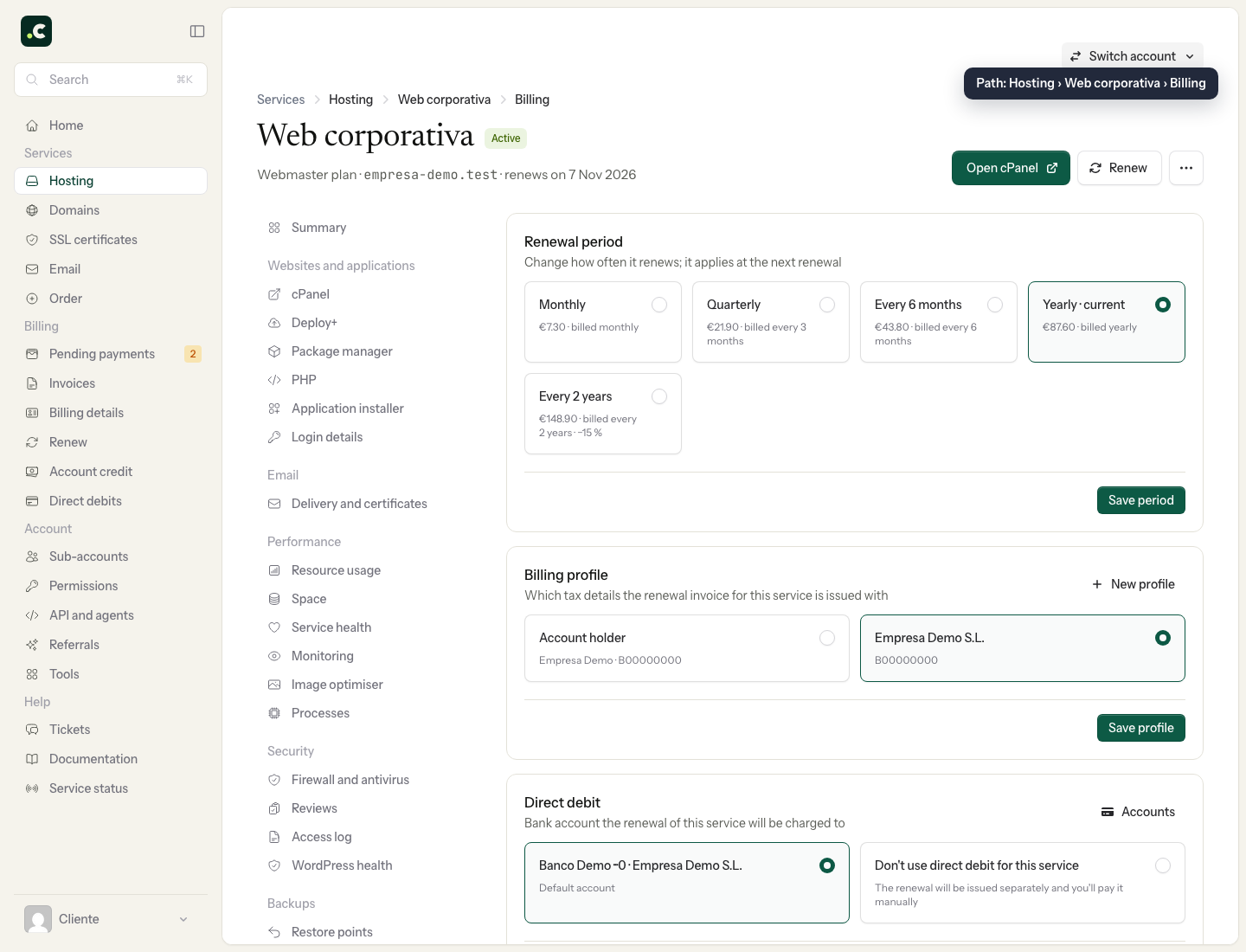
From then on, new proforma invoices for that service will use the details of the assigned profile.
The assignment does not on its own correct a proforma invoice that already exists or an invoice that has been issued. For those documents, use Edit billing details on the proforma invoice or the invoice, if it still allows changes.
This assignment decides the tax details; it does not grant access to the account or, on its own, change the bank account used for payment. If hosting and domain should be invoiced to the same recipient, check each service separately.
You may also find useful
- Billing profiles Describes what profiles with third-party details are for, how to create several and when to apply th...
- Change your personal contact and billing details Shows where to change the account's main contact, holder and billing details when you do not use sep...
- Default billing details Shows how to select a default profile for invoices and reminds you that each service can have differ...
- Download my data Shows how to download the main account data, its services and paid invoices in JSON format, and expl...
Something wrong or out of date? Tell us and we will review it.