

Hosting and cPanel
Temporary disk space increase
When the disk runs out, operations that need to write data can fail, such as receiving messages or saving an application's sessions.
The temporary increase gives you headroom to find what is using space, clean up identified content or order permanent capacity.
To make this easier, the client area has the Double space for 72 h option, which applies a temporary increase. After requesting it, check the resulting quota and the end date shown in the panel.
Go to the client area, Hosting section, open the service page and go to Space. Next to the disk meter you have the Double space for 72 h option, marked as free; the button itself tells you how many doublings you have left this month. The request is processed when you click the button; wait for the result and check the quota before trying again.
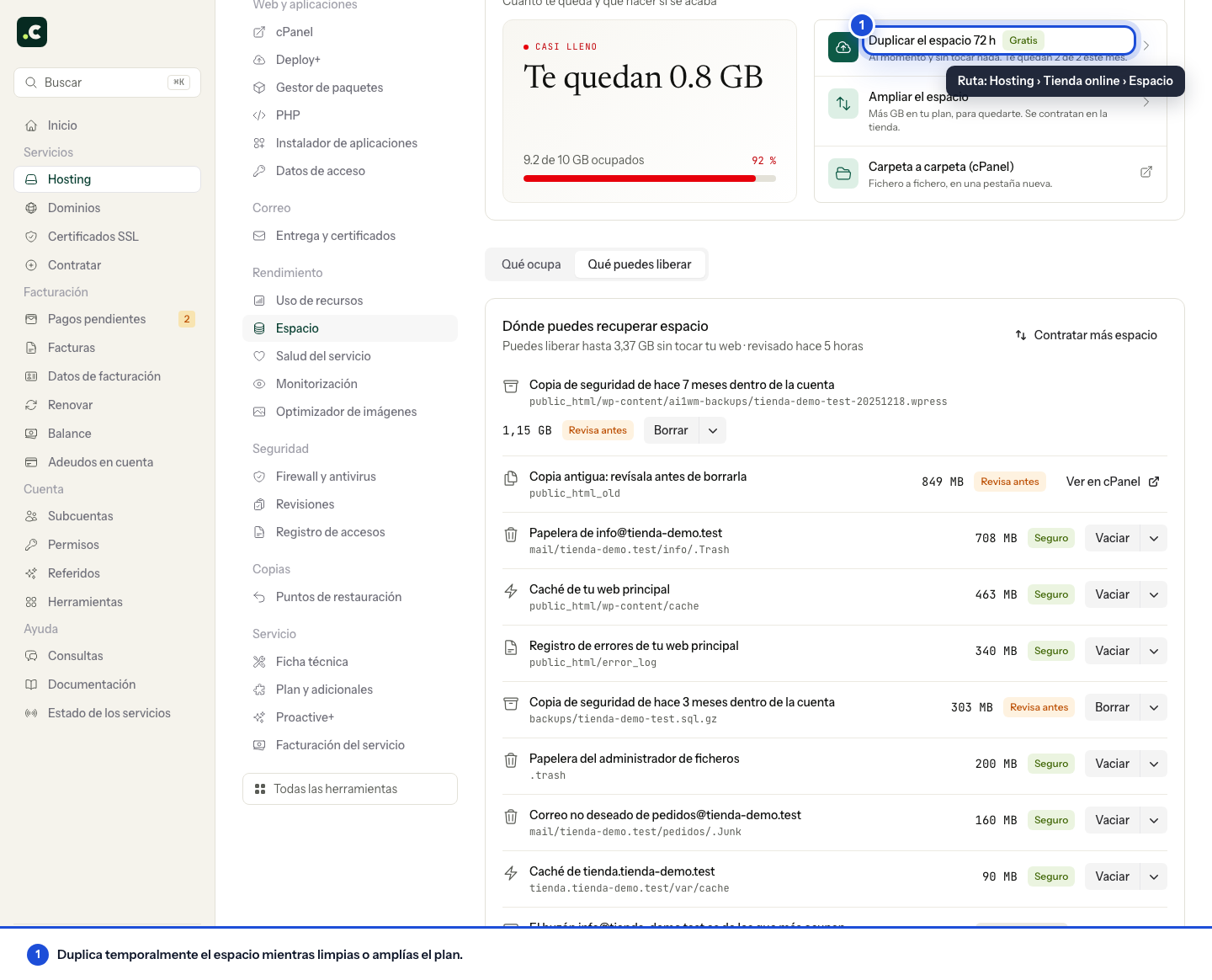
There is a maximum of 2 requests per month on the Inicia, Webmaster, Avanza and Max plans. The button shows the remaining requests.
On Elastic plans, disk is managed from Elastic plan, with the adjustment conditions shown on that screen.
While an increase is active, the panel shows when it expires instead of offering another one. The temporary capacity ends after 72 hours. Before it expires you must have reduced usage below your plan's space or upgraded the service; otherwise the account will be over its quota again and operations that need to write data may fail.
The aim is to have headroom over current usage, not to reserve permanent capacity. If the figure applied is not what you expected, or writing still fails, contact support before repeating the request.
You may also find useful
- Increase the space on a hosting service Add permanent space to your hosting from the client area in blocks from 1 GB, or compare whether mov...
- Disk space notifications - cPanel and client area Understand the thresholds, recipients and frequency of cPanel and client area space alerts, includin...
- Increase CPU, RAM and concurrent processes Increase CPU, memory and processes from the client area with a higher plan or extra blocks for Avanz...
- Free up hosting space from the client area Find caches, trash folders and backups that take up space, review what you can delete and check how...
Something wrong or out of date? Tell us and we will review it.