

Security and SSL
Add an IP to your hosting firewall whitelist
Sometimes a legitimate IP address (for example, that of an SEO consultant, developer or external tool) may be blocked by the hosting's security systems. To avoid interruptions to access or to tasks such as SEO crawls, you can manually add an IP to the firewall whitelist from your client area.
This feature lets you authorise an address in the service's compatible controls. A whitelist reduces the checks applied to that IP, so it should be used with the narrowest scope and for the shortest time possible.
When should you use the IP whitelist?
- When a legitimate IP has been blocked by the firewall.
- If a confirmed rule prevents the authorised work of a provider, developer or monitoring tool.
- To avoid blocks during migrations, audits or specific technical tasks.
Before authorising it, confirm the exact IP with the provider and check that it is not an exit shared by users you do not control. Do not add broad ranges to solve a one-off block.
How do you add an IP to the whitelist?
- Go to your client area.
- Go to Hosting and open the relevant service.
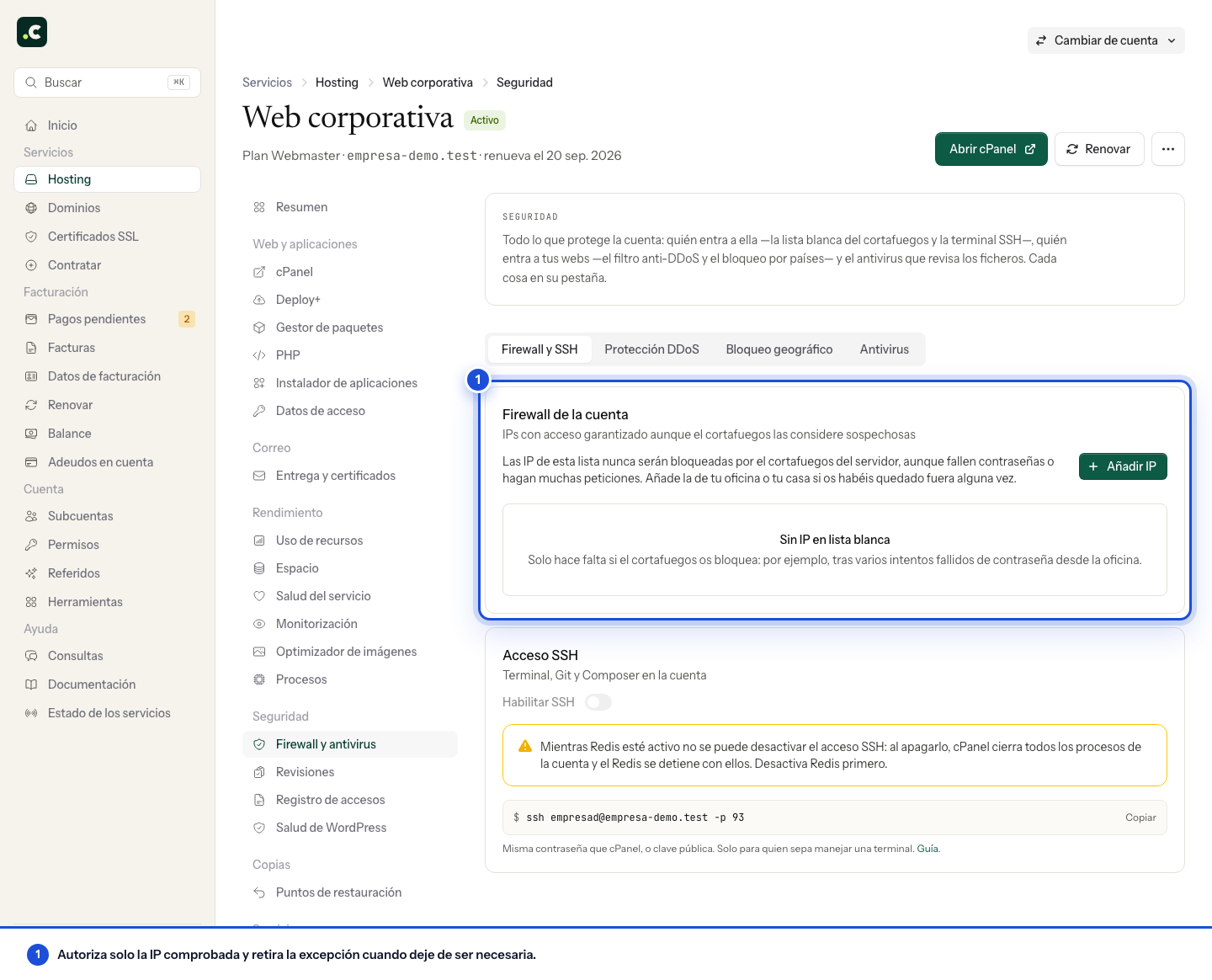
- Go to Firewall and antivirus.
- Find the Account firewall section.
- Click Add IP and enter the IPv4 address or CIDR range you need to authorise. You can add a description to recognise it later.
- Click Add to the list.
Then check that the task works and remove the exception when it is no longer needed. If the block continues, do not widen the list blindly: first check which system and which rule are causing it.
If the exception does not change the result
Check whether the tool goes out through another IP, uses IPv6 or works from several nodes. Ask the provider for the specific exit address used for the test; do not authorise a whole range just because they own it.
The firewall list does not remove restrictions from an application, an .htaccess rule, a CDN or a country list. Keep the error and the time so you can find the control that is acting before widening permissions.
You may also find useful
- Block an IP from web access in cPanel Create a specific block, check its scope and remove it when it is no longer needed, without confusin...
- Block or allow access by country Explains how to set up a per-domain blacklist or whitelist of countries from the client area and the...
- Enable web DDoS protection per domain Check when to apply an extra check to visitors, how to enable it and which integrations you should t...
- What to do if Imunify360 blocks your access Explains why an IP may be blocked, how to check whether the block comes from Imunify360 and what to...
Something wrong or out of date? Tell us and we will review it.