

Security and SSL
Enable web DDoS protection per domain
The panel's DDoS protection applies an extra check to the domain's web traffic using LiteSpeed's protection. It can help contain automated traffic that consumes resources, but a spike in visits does not by itself prove an attack.
Before you enable it
Check the affected domain, when the increase happened and the resource usage. A slow process, an empty cache or a legitimate campaign can produce similar symptoms. If there is an ongoing incident and you cannot identify it, contact support.
The check may present a challenge to legitimate visitors. APIs, webhooks, mobile apps and other integrations without a browser may not pass it. Identify which ones your website needs to work, especially payments and notifications.
Enable it from the client area
In Hosting, open the service and go to Firewall and antivirus > DDoS protection. On a multi-account hosting plan, first choose the affected account. Review the domain and use its toggle.
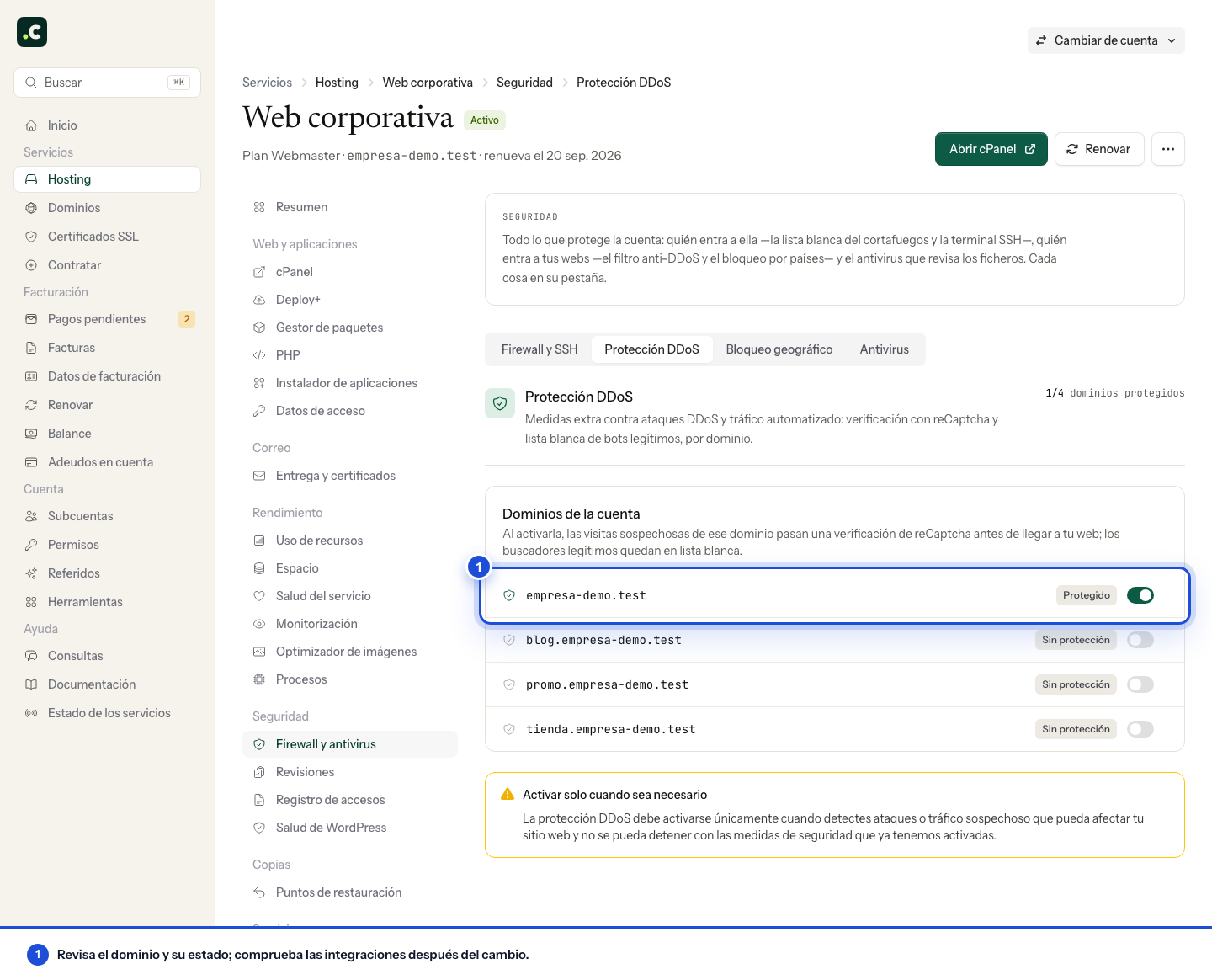
Check the status the panel shows and allow a short while for the change to take effect. The setting is per domain; do not assume that enabling one protects all the others.
Check browsing and integrations
Open a new session and test the important pages. Some connections pass a transparent check and others receive a challenge; VPNs, cookies and blockers can change that behaviour.
Check forms, payment, external calls and monitoring. Known crawlers may receive specific treatment when they are validated, but there is no guarantee that all legitimate bots or search engines will be exempt. Also check their tools if you keep the protection on for longer.
When to remove it
Watch whether the problem traffic goes down and whether legitimate errors reappear. Turn off the protection from the same section when it is no longer needed and test again. It is not a universal solution for network attacks, nor does it replace analysing logs, updates and access controls.
You may also find useful
- Add an IP to your hosting firewall whitelist Shows how to authorise, from the client area, a legitimate IP blocked by the firewall so that develo...
- Allow web access to a directory from one IP only Restrict a folder with Require ip, check the IP the server sees and keep a way to revert the change.
- Block an IP from web access in cPanel Create a specific block, check its scope and remove it when it is no longer needed, without confusin...
- What to do if Imunify360 blocks your access Explains why an IP may be blocked, how to check whether the block comes from Imunify360 and what to...
Something wrong or out of date? Tell us and we will review it.