

Security and SSL
View a hosting account's access log
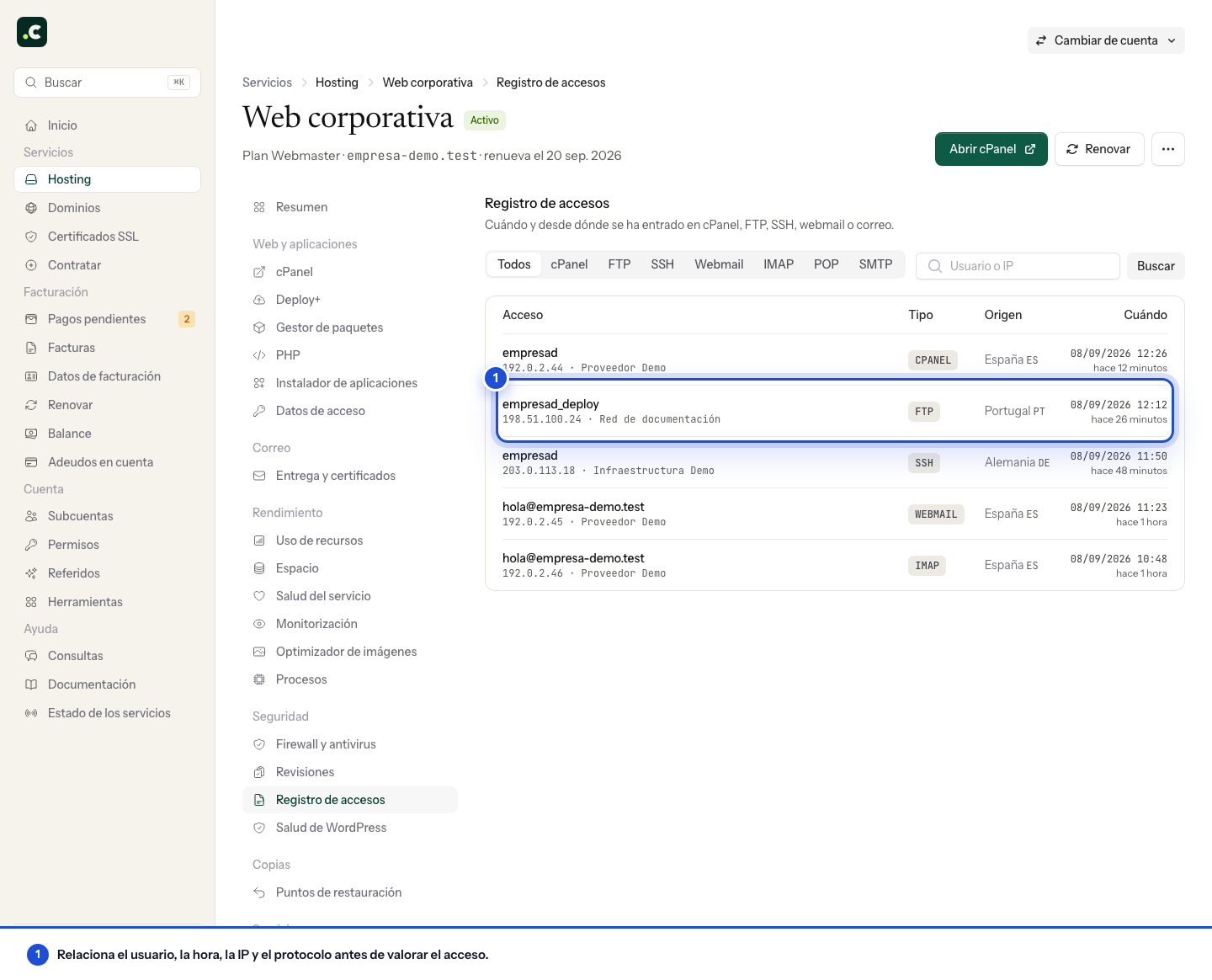
Open the service under Hosting and go to Access log. On a multi-account plan, first open the account of the client you want to check.
The screen brings together logins to:
- cPanel;
- FTP;
- SSH;
- webmail;
- IMAP, POP and SMTP.
Each row shows the user, the IP, the network provider when available, the estimated country, the protocol and the date. The location is inferred from the IP and may be inaccurate, especially with mobile networks, VPNs or corporate connections.
Filter and search
Use the tabs to limit the results to one protocol. The search box accepts a username or an IP. You can combine both controls; click the cross in the search box or All to clear the filters.
Review a login you do not recognise
- Check that the user belongs to a known account.
- Compare the time, IP and protocol with the devices and applications you have set up.
- Remember that an email client can connect over IMAP or SMTP without anyone opening the panel at that moment.
- If the login still does not add up, change the password of the affected credential and review any other accounts with the same password.
This log shows the account's authenticated logins. It is not the HTTP log of visits to the website, and on its own it does not prove that content has been modified. If you suspect an intrusion, ask for a security review, giving the user, the IP and the date.
Compare with the client area log
Hosting logins and client area logins are not the same log. For the latter, open My account > Security > Recent logins. Identify which service you are investigating before concluding that a session is missing.
The absence of a row within the available period does not prove that an action never happened. If you need to investigate an earlier period or relate logins to file changes, give support the period and the user so that we can check the logs that are kept.
You may also find useful
- What to do about a suspicious login alert for cPanel or email Helps you check an unusual login to cPanel or email, tell legitimate activity apart and secure crede...
- Enable two-step verification in the client area Set up a TOTP app to protect your login and prepare for changing phone without losing your second fa...
- Exclude a directory or file when protecting a directory with a username and password Shows how to exclude a specific file from basic authentication with a Require rule in .htaccess with...
- How passwords are stolen and what to check if it happens Recognise phishing, password reuse and compromised devices, and regain control of the affected crede...
Something wrong or out of date? Tell us and we will review it.