

Backups and migrations
Hosting backups: what to keep and how to restore it
A backup lets you recover information from an earlier point in time: files, databases, email or configuration. To be useful, you need to know what it contains, what date it is from and how to restore it.
Which backups you have at Hostsuar
We make daily backups and store them off the hosting server, on separate backup servers in the same data centre in Amsterdam (Netherlands, within the EU). The configured retention policy is 50 daily points, 15 weekly and 15 monthly. Weekly and monthly points do not mean there is a backup for every day of that period.
Go to Hosting > Manage > Backups > Restore points to see the dates available for your account. The Retention figure describes the span observed between the available points; it does not guarantee a backup exists for any date in between. A new account also has no backups from before it was created.
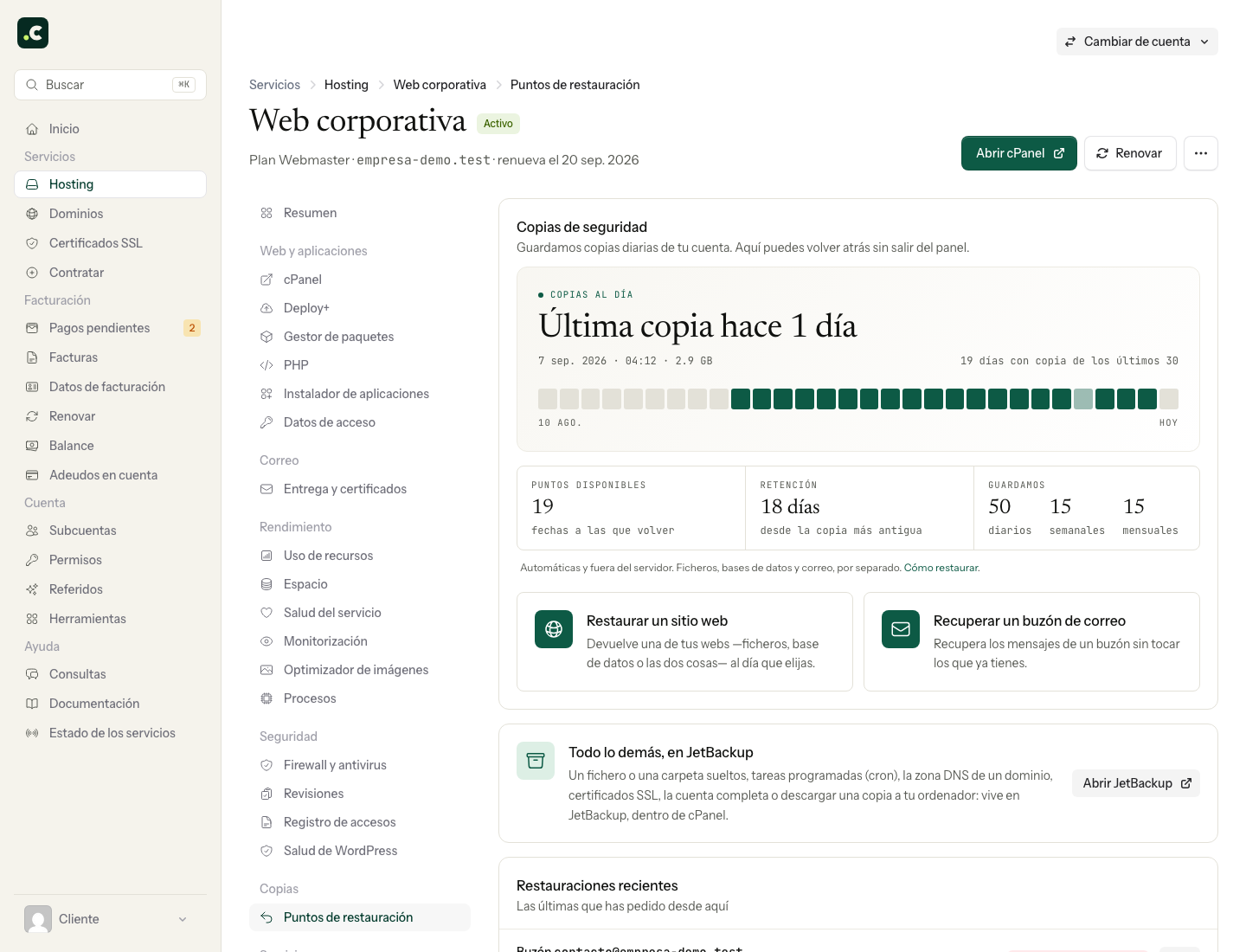
If the date you need is missing or an error appears when you check the backups, contact support before picking another point as an approximation.
Choose the type of backup for the task
| Need | Option |
|---|---|
| Undo a recent change to a website | Restore its files and/or database from an earlier point |
| Recover deleted messages | Recover the mailbox while keeping current email |
| Save the state just before a change | Create your own or an on-demand backup and wait for it to finish |
| Archive a website you are going to retire | Download an independent backup and test recovering it |
| Move a complete cPanel account | Generate a full backup and arrange its restore with support |
Provider backups rotate. To keep a specific version long term, also store your own backup in a separate location. This also lets you choose its frequency and keep access even if you change service.
How often to make your own backup
First think about how many changes you can afford to lose. If a shop receives orders every hour, a daily backup could leave out many orders. You will need a frequency and a recovery procedure that match that activity.
For a static website that hardly changes, it may be enough to save a version before and after each change, keeping several older ones. Email and databases may need a different frequency even if the home page does not change.
Full or partial backup from cPanel
Open Backup or the Backup Wizard.
- Full: gathers the account components that cPanel includes. You can generate and download it; restoring the full package needs the provider to step in.
- Home directory: backs up the files included in the account directory. It does not replace a dump of its databases.
- Database: saves the selected database; it does not include the application files.
- Forwarders and filters: saves those email settings; it is not the same as backing up the messages in every mailbox.
Check exclusions, external files and services that do not belong to the account. None of these options copies data from an external platform on its own.
The Home Directory destination uses space on your hosting. Wait for the generation to finish, download the file over a secure connection and keep the backup outside the public folder. Do not delete local backups until you have verified the ones you will keep elsewhere.
How to check a backup
Write down the date, components, size and recovery method. Check that the file downloads in full and can be read. A checksum lets you detect differences between two files, but it does not prove on its own that the application can be restored.
Test recovery from time to time in a separate, compatible environment, without running payments, sending email or connecting to production. Check content and functionality before relying on that backup to retire the original.
Restore only what you need
For a website or a mailbox, follow recovery from the client area. For specific files, databases, settings or downloads, use JetBackup.
Before restoring, keep any current state you might need. If you recover a shop's database, orders placed after the chosen point may disappear. Coordinate writes and confirm the result before reopening the application. Restoring a whole account to fix a single website can also affect other sites and email.
You may also find useful
- Automate backups with cPanel and cron Request backups with UAPI and decide how to check they have finished, transfer them and keep version...
- JetBackup for WordPress: restore provider backups from WordPress Connect the plugin to Hostsuar's backups, select files and database and check the result of the rest...
- Restore a website or recover email from the client area Check the site, folder, database and date before restoring, or recover messages while keeping recent...
- Restore or download backups with JetBackup Choose the date and the smallest resource to restore files, databases, email or settings, or prepare...
Something wrong or out of date? Tell us and we will review it.