

Domains and DNS
Set up DNSSEC on a domain that uses Cloudflare
When a domain uses Cloudflare as its DNS server, setting up DNSSEC works differently from cPanel. Cloudflare manages the signing keys automatically and gives you the details you need to set up DNSSEC with the registrar.
Step 1: Enable DNSSEC in Cloudflare
Log in to your Cloudflare account at dash.cloudflare.com and select the domain you want to protect.
In the side menu, go to DNS and then Settings. Find the DNSSEC section and click Enable DNSSEC.
Cloudflare will show the DNSSEC details it has generated. These details belong to the KSK (Key Signing Key):
Copy the values for your domain. Don't use keys or digests from an example. Cloudflare may show both the DS record and the public key: they are different things. In the Hostsuar form you'll use the Public Key and its Algorithm; another registrar may ask you for the DS fields instead.
Step 2: Set up DNSSEC in the client area
Go to the client area, Domains section, click Manage on the domain and open DNSSEC in the domain's side menu, in the DNS and domains group.
Fill in the form with the KSK (Key Signing Key) details:
- Algorithm: select the number Cloudflare shows for that key; if it shows 13, that is ECDSA P-256 (13)
- Public key: paste the Public Key shown in the Cloudflare dashboard
The number in brackets in the algorithm selector must match the Algorithm value shown by Cloudflare (13 in this case).
You can leave the ZSK key (optional) section empty. At registrar level only the KSK is needed to establish the DNSSEC chain of trust.
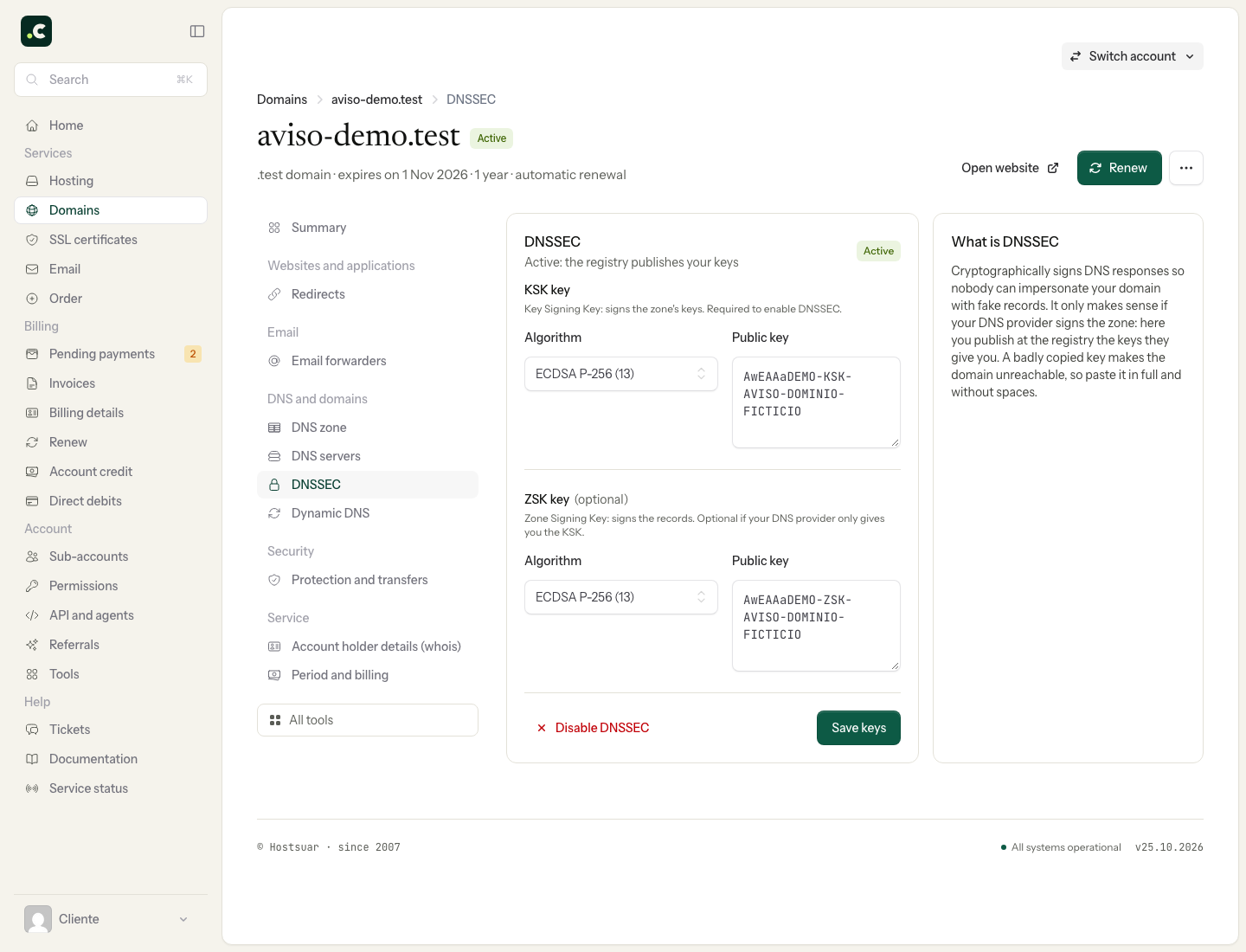
Click Save keys and wait for the configuration to propagate.
Step 3: Check the configuration
Once it is set up, Cloudflare will automatically detect that the chain of trust is complete. In Cloudflare's DNSSEC section you'll see a message confirming that DNSSEC is active.
You can also check the DNSSEC status with online tools such as Verisign DNSSEC Debugger.
Disable DNSSEC
If you need to disable DNSSEC, do it in the reverse order:
- First, go to the client area, open DNSSEC in the domain's page and click Disable DNSSEC
- Wait for the TTL of the previous DS record in the parent zone to expire and check that it has been publicly removed.
- Then disable DNSSEC in the Cloudflare dashboard
Following this order is critical. If you disable DNSSEC in Cloudflare before removing the keys at the registrar, the domain will stop resolving correctly until propagation is complete.
FAQ
How long does DNSSEC take to activate?
Propagation can take anywhere from a few hours to 48 hours, depending on the domain's TLD and the cache times of DNS servers.
Which algorithm does Cloudflare use?
Cloudflare uses algorithm 13 (ECDSA P-256 with SHA-256) for its DNSSEC keys.
My domain uses Hostsuar's DNS, not Cloudflare
In that case, see the article What DNSSEC is and how to set it up in cPanel to generate the keys from cPanel, and then how to add DNSSEC keys to the domain to set them up with the registrar.
You may also find useful
- Add DNSSEC keys to a domain at Hostsuar Complete the registrar's DNSSEC link with the correct public key and check it is published before ch...
- What DNSSEC is and how to set it up in cPanel Enable DNSSEC signing in cPanel and complete the link with the registrar; check the chain and learn...
- Change a domain's nameservers Prepare the new zone, change the nameservers from the client area and check your website and email d...
- Create and edit DNS records with Zone Editor Edit the DNS zone in cPanel, understand each record type and check the impact before replacing or de...
Something wrong or out of date? Tell us and we will review it.