

Domains and DNS
Change a domain's nameservers
Changing the nameservers sets which provider answers for your domain's zone. It can affect your website, email and other services at the same time. If you only need to change an IP or add a verification, editing the relevant record with your current DNS provider is usually enough.
Before you save the change
Set up with the new provider the records that need to keep working: the website with and without www, email, subdomains and verifications. Also keep a note of the previous nameservers and values so you can refer to them.
If the domain uses DNSSEC, coordinate the transition of its keys and DS records with the provider. A new delegation with old validation data can stop the domain from resolving. Don't copy a key from the previous provider as if it belonged to the new one.
Change the nameservers at Hostsuar
- Log in to the client area, open Domains and click Manage on the domain.
- Open Nameservers.
- Enter the full names given by your provider, without
https://or IP addresses. The form accepts two to four: DNS 1 and DNS 2 are required. - To use ours, you can click Use Hostsuar DNS. The button fills in the form; check the values and click Save DNS to submit them.
- Check that the operation is accepted and that the saved nameservers are the ones you expect.
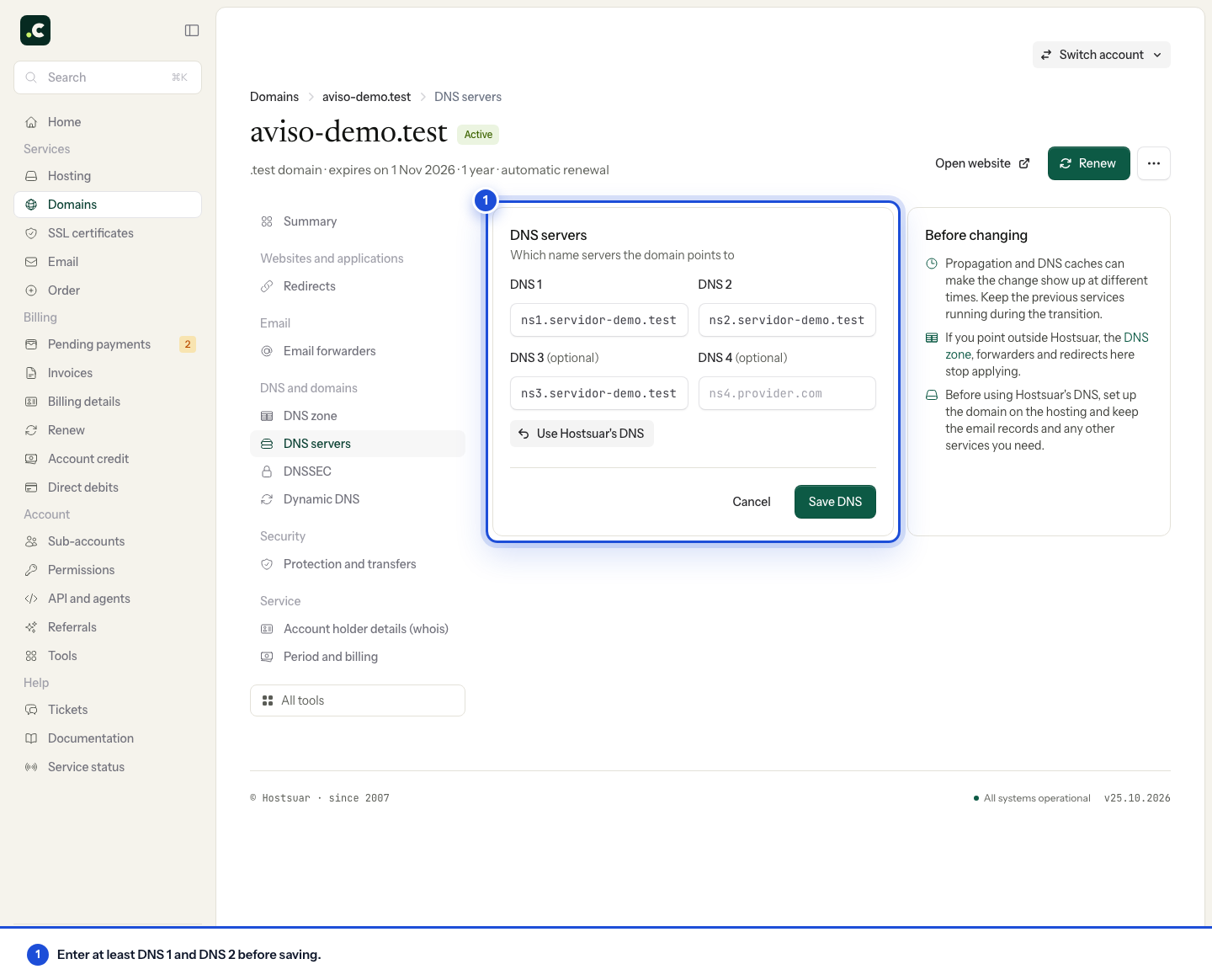
Don't mix providers to fill empty fields or repeat a server. If your provider asks for more than four, contact support before leaving any out.
If the domain is registered with another company, change the nameservers there. You can look up Hostsuar's nameservers without transferring the domain registration.
Check the result
The form accepting the change doesn't mean every user can see it yet. Publication of the delegation and caching can produce different answers during the transition.
For .es domains, Nic.es distributes delegation changes in cycles. Check the DNS publication times for .es domains before putting the wait down to caching alone.
Follow the DNS and IP check, test the website and email separately and keep the previous services running until the transition is complete. If the domain doesn't resolve, check the delegation, the zone and DNSSEC rather than waiting indefinitely.
If you are moving a website, use the guide to changing DNS with minimal downtime.
You may also find useful
- Hostsuar nameservers Look up Hostsuar's nameservers and prepare your domain's zone before changing the delegation.
- Delegate a subdomain with NS records Prepare a subdomain delegation to other nameservers without changing the main domain's nameservers.
- Look up a domain's records with Track DNS Use cPanel's Domain Lookup to query a domain and tell caching, missing records and resolution failur...
- Nameservers, zones and records: the difference Work out where to change a record and when you need to change the nameservers, with examples of sepa...
Something wrong or out of date? Tell us and we will review it.