

How to check and improve email deliverability
Deliverability is the ability of a legitimate email to reach the recipient and not be rejected, deferred or classified as spam. It does not depend on a single score: domain authentication, sender reputation, content, volume and the receiving server's response all play a part.
Before changing records or sending again, tell these two cases apart:
- Rejection or deferral: the receiving server does not accept the message and returns an SMTP code. That code is the main evidence for finding the cause.
- Delivered to spam: the receiver accepts the message, but its filter then classifies it as unwanted mail. Here authentication, reputation, content and recipients' engagement all have an influence.
Review the domain from the client area
In Hosting > Delivery and certificates, open the domain to review the observed configuration and its date. A warning points you to the next step, but does not on its own prove what happened to a message.
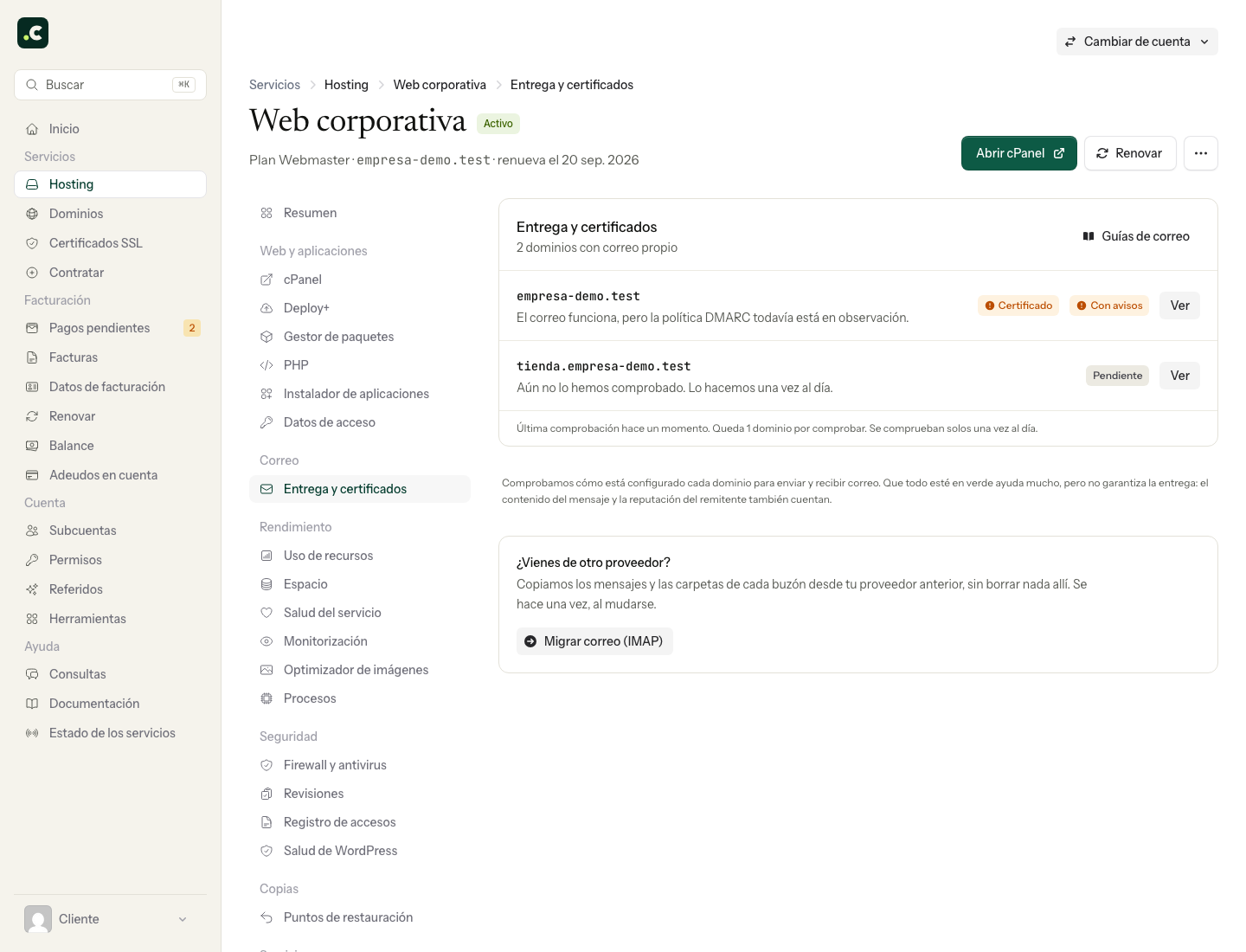
Continue with the email health guide if you need to interpret each check.
Review SPF, DKIM, DMARC and PTR in cPanel
Go to cPanel > Email > Email Deliverability. The table shows the status of the records related to each domain and lets you click Manage to see the current and suggested values.
The four main elements are:
- SPF: declares which servers may send email on behalf of the domain. It must include every real sending service, but you should not add providers you do not use.
- DKIM: shows that the signing domain controlled the signature and lets the integrity of the signed content be checked. It does not prove on its own who the person who wrote the message is.
- DMARC: says how to handle messages that fail authentication and lets you receive reports. A message passes DMARC when it passes SPF with alignment or DKIM with alignment; both mechanisms do not need to pass at once. For bulk sending, however, Gmail and Yahoo do require both SPF and DKIM to be set up.
- PTR or rDNS: links the outgoing IP address to the server's name. It is managed by whoever controls that IP, not the owner of the domain's DNS zone.
If cPanel controls the DNS zone and detects an invalid record, the Repair button lets you review and apply its suggestion. If the authoritative DNS is on Cloudflare or another provider, copy the suggested value and set it up at the authoritative provider; repairing it only in the local zone does not change the public DNS.
Do not publish a second SPF record. A domain must have a single SPF record that brings together all authorised senders.
The official cPanel Email Deliverability documentation explains what each check means and its limitations.
Check a real message with the email test
Our email test reviews the headers, authentication (SPF, DKIM and DMARC alignment), the reputation of the outgoing IP address and the format of a specific message:
- Open the email test and generate a test address.
- Send an email to that address from the same account, application and server that has the problem.
- Use a representative template, with the same links, images and type of content as the real message.
- Wait on the page for it to arrive and read the full report, not just the overall score.
The report helps you spot SPF, DKIM or DMARC failures, incomplete headers, problematic links and content patterns. A high score is a useful sign, but it does not guarantee delivery to the inbox: each provider also applies its own reputation and engagement history.
Step-by-step diagnosis
- Check delivery tracking in cPanel and keep the full rejection code and text, if there is one.
- Check which service actually sent the message and which address appears in
From,Return-Pathand the DKIM signature. - Review Email Deliverability and check the records against the public DNS.
- Send an equivalent sample to the email test and fix the specific sections of the report.
- Repeat the test with a single message. Resending in a loop after a temporary rejection can make your reputation worse.
- If the receiver accepted the email but put it in spam, also review volume, consent, unsubscribes, complaints and the domain's reputation.
For sending to personal Gmail accounts, the official sender guidelines require authentication, valid forward and reverse DNS, TLS transport and a spam rate below 0.3%. Anyone sending close to 5,000 or more messages in 24 hours must also have SPF and DKIM, DMARC and alignment. One-click unsubscribe is required for marketing or subscription messages, not for every transactional message.
What information to keep when asking for help
Give the sender, recipient, approximate date, subject and full SMTP error. If the message was delivered to spam, add the original headers and the link to the email test report. Do not send passwords or private DKIM keys.
If you need an environment set up for authenticated email and PHP applications, see our PHP hosting plans, with technical support to review the configuration and track your messages.
Choose the test according to the symptom
| Symptom | First check |
|---|---|
| The form says it sent, but nothing arrives | The message's tracking and the SMTP server the application uses |
| Permanent rejection | The receiver's full code and the authentication of that route |
| Temporary deferral | The queue and the reason for the deferral, avoiding duplicate sends |
| Accepted by the receiver, but in spam | Original headers, reputation and content |
| Only fails when forwarded | Whether DKIM survives and the forwarding route |
Do not confuse the email provider with the DNS provider: Google Workspace or Microsoft 365 may manage the mailboxes while the zone stays at Hostsuar. The fix must be applied to the component that is failing.
You may also find useful
- Authenticate a Hostsuar domain in Brevo Explains how to copy the records Brevo provides into the authoritative DNS zone, avoid duplicate SPF...
- Changes to the requirements for sending email to Gmail and Yahoo Summarises Gmail's and Yahoo's current requirements on authentication, DNS, TLS, reputation and easy...
- SPF and DKIM: what they authenticate and where to set them up Tell SPF, DKIM signing and DMARC alignment apart, and choose the setup that matches the service that...
- Manage SPF records Shows how to authorise in SPF the external servers that send on behalf of a domain, using the Email...
Something wrong or out of date? Tell us and we will review it.