

Development and databases
Different PHP versions per directory or domain
Your hosting has a default PHP version, but each website and each folder can have its own. That way you can keep applications with different requirements on the same hosting.
From the client area, without editing files
Go to Hosting, open your service and go to PHP. The Your websites and applications list shows each website's version and where it comes from.
- To change the version of a website, click Change on its row. See how in Change a website's PHP version.
- To set the version on any folder, click the folder icon on its website's row, or Set on a folder on the website's page.
Set the version on a folder
The browser starts in the folder of one of your websites and reads each folder as you open it. For each one it shows the version it uses now, whether it is its own or inherited from a parent folder, whether it is empty and whether it contains an application we recognise.
Click a folder to go into it. When you reach the one you want, click Change on its row, or Change this folder if it is the folder you are in, and the version scale opens. Choose the version and click Set. We write the version into its .htaccess and keep a dated copy of the previous file. The version applies to that folder and everything below it.
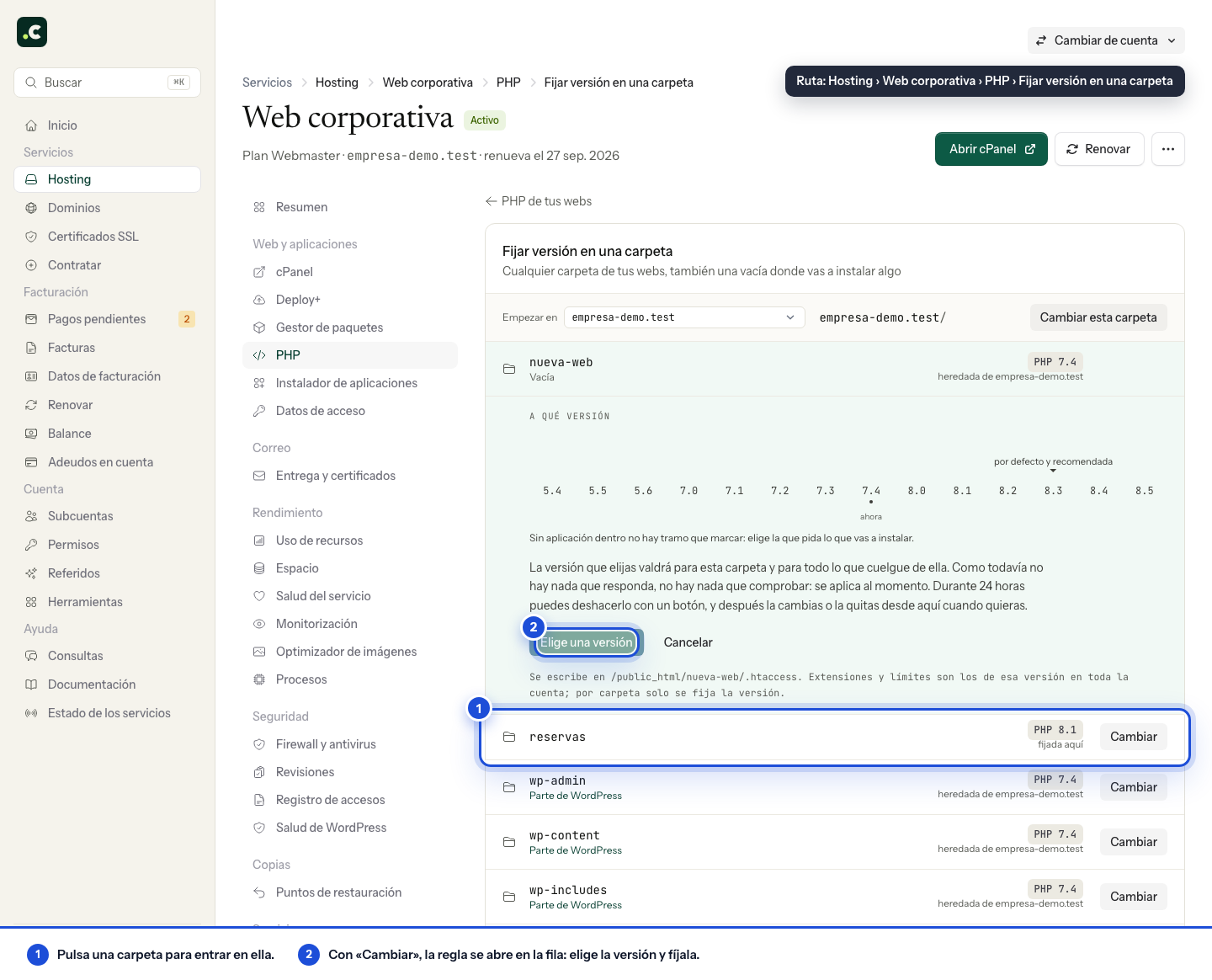
- If the folder has content, we check before and after that it responds. If it stops responding, we roll back on our own.
- If the folder is empty, for example because you have just created it to install an application there, there is nothing to check yet. The version is applied anyway and whatever you install will use that version from the start.
In both cases you have 24 hours to undo it with one button.
Do not set a version only on wp-admin, wp-content or wp-includes: they are part of a WordPress installation and would split it across two versions.
Websites and folders published by Deploy+ do not accept a version from the client area: each deployment replaces the published folder and the version would be lost. See how to set it in PHP version on a website published with Deploy+. A version cannot be set on other folders that are links either.
What is configured per folder and what per version
Only the version is set per folder. PHP extensions and limits (memory_limit, upload_max_filesize and the rest) belong to each version across the whole account. If you enable an extension on PHP 8.3, it is enabled for everything that runs on 8.3. Each website's page tells you which other websites share its version.
Editing .htaccess by hand
Before editing the file, keep a copy and confirm the domain's actual root. Add the directive to the .htaccess of the folder from which it should apply; subdirectories will inherit it unless they have a later rule of their own. For example, for PHP 8.4:
AddType application/x-httpd-alt-php84 .php
The available directives are:
# PHP 5.4
AddType application/x-httpd-alt-php54 .php

# PHP 5.5
AddType application/x-httpd-alt-php55 .php

# PHP 5.6
AddType application/x-httpd-alt-php56 .php

# PHP 7.0
AddType application/x-httpd-alt-php70 .php

# PHP 7.1
AddType application/x-httpd-alt-php71 .php

# PHP 7.2
AddType application/x-httpd-alt-php72 .php

# PHP 7.3
AddType application/x-httpd-alt-php73 .php

# PHP 7.4
AddType application/x-httpd-alt-php74 .php

# PHP 8.0
AddType application/x-httpd-alt-php80 .php

# PHP 8.1
AddType application/x-httpd-alt-php81 .php

# PHP 8.2
AddType application/x-httpd-alt-php82 .php

# PHP 8.3
AddType application/x-httpd-alt-php83 .php

# PHP 8.4
AddType application/x-httpd-alt-php84 .php

# PHP 8.5
AddType application/x-httpd-alt-php85 .php
A folder you customise by hand appears in the PHP list with its version at the next scan of your hosting, which runs once a day. If you do not want to wait, click Refresh in Technical details.
Check the change
The directive changes the interpreter for web requests under that path, not the terminal's PHP version. Check the effective version from the application or with a temporary phpinfo() and delete that file after the test.
If a missing extension error appears after the change, check the Extensions tab on the website's page: it shows those of the version it uses. If you edit .htaccess by hand, keep only the handler you need; several AddType, AddHandler or SetHandler directives can interfere with each other. If the rule does not work, remove it and use the client area or ask support.
You may also find useful
- PHP version on a website published with Deploy+ Why the client area does not set the PHP version on a folder published by Deploy+, and how to set it...
- PHP versions available on all hosting services See the available PHP versions, why they all work and receive patches, and how to choose the right o...
- Change a website's PHP version with checks and rollback Change a website's PHP version, or your hosting's default version, from the client area, with a comp...
- PHP binary paths for each version Use the absolute path of each PHP version's binary when running cron jobs, commands or scripts that...
Something wrong or out of date? Tell us and we will review it.