

Change a domain's MX records (mail server) in cPanel
MX records tell the world which servers your domain's email is delivered to. It's common to have the website on our hosting and email with another provider, such as Google Workspace or Microsoft 365, or to use an external spam filtering system that filters email before delivering it here.
Changing the MX records only changes where new email arrives: it doesn't copy the messages you already have or create the accounts at the destination. If you're switching provider, create the accounts there first and see how to migrate your email without losing messages.
Before you start
Your new provider will give you the MX servers and their priority. For example, Google Workspace uses a single record: smtp.google.com with priority 1.
- The priority sets the order of the servers: the one with the lowest number is tried first.
- The destination is just the server name, without
https://or paths.
Note down the MX records you have now, in case you need to go back.
If your domain's DNS isn't with Hostsuar (for example, if you use Cloudflare), make the change there: whatever you change in cPanel won't have any effect. If the domain is with us but without hosting, change them in the DNS zone in the client area.
Change the MX records in cPanel
-
In cPanel, go to Domains > Zone Editor.
-
Click Manage next to the domain and filter by MX records.

-
Click Edit on the current MX record and change the destination and priority to your provider's. Save.
-
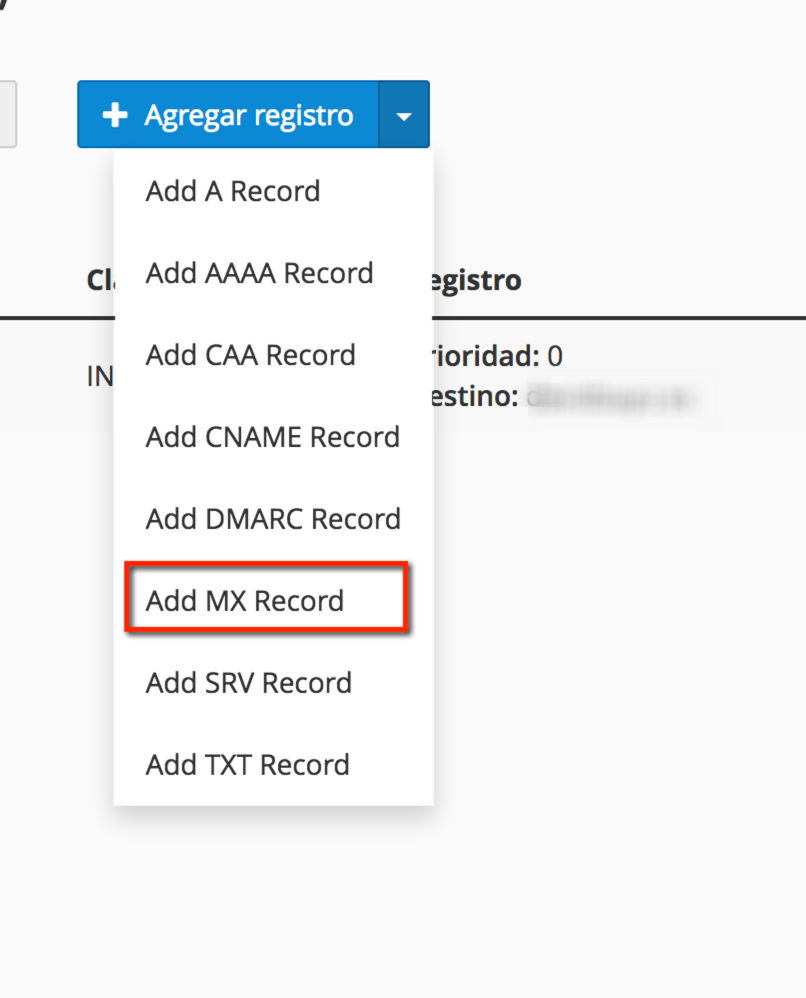
If the provider has given you more than one server, add the rest with Add MX Record (or + Add Record > Add "MX" Record), one for each server.
-
Delete the old MX records that aren't on your provider's list. When you've finished, only the new provider's should remain.
Don't leave MX records from two providers at the same time thinking email will reach both: each message will be delivered to only one of them and your email will end up split between them.
Adjust email routing
Finally, tell cPanel whether email is stored here or elsewhere. Go to Email > Email Routing, choose the domain and select:
- Remote Mail Exchanger: email is with another provider (Google Workspace, Microsoft 365…). That way, emails your website sends to addresses on your domain will be delivered to that provider and not to a local mailbox.
- Local Mail Exchanger: email is stored on this hosting.
- Automatically Detect Configuration: cPanel decides based on the MX records. If something doesn't work, select the correct option manually.
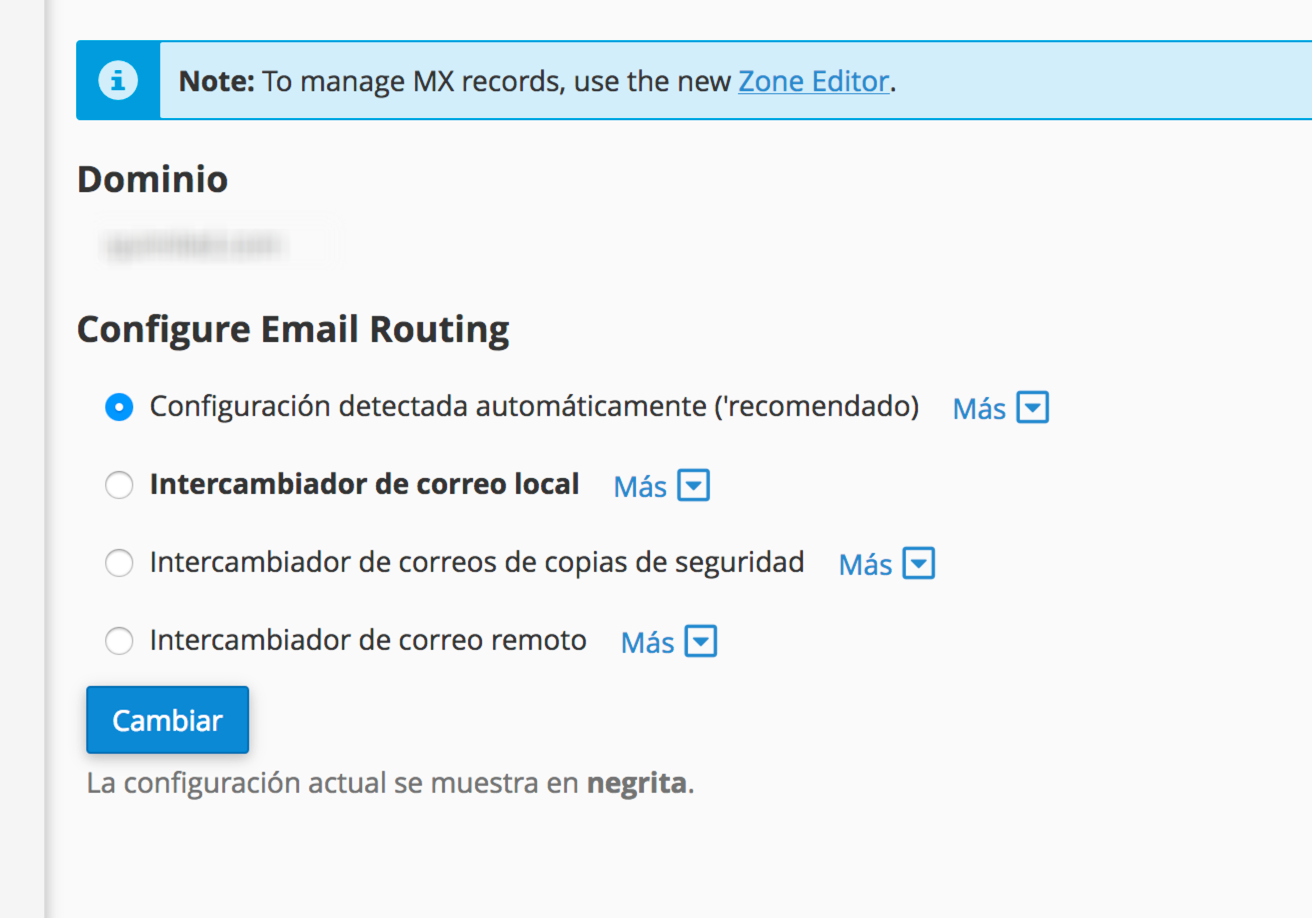
If you use the MX records of an external spam filtering system that filters email and then delivers it to our servers, select Local Mail Exchanger. Otherwise, the filtered email will be rejected when it arrives.
There are more details on each option in email routing.
Also check the SPF record: if the new provider sends email with your domain, it has to be included. See manage SPF records.
Check the change
The change usually takes a few minutes, although some servers may keep using the old MX records for a few hours. To see which MX records your domain has published, run this in a terminal:
dig MX tudominio.com +short
Or use a web tool such as MXToolbox. Then send an email from an external account (Gmail, Outlook…) and check that it reaches the new provider.
During the first few hours some email may still arrive at the old server: don't delete the old accounts until you've checked they're no longer receiving anything.
You may also find useful
- Set up Google Workspace for a domain hosted on cPanel Set up Google Workspace as the email provider for a domain hosted on cPanel: users first, verificati...
- Split delivery: combine Hostsuar and Google Workspace mailboxes How to split the mailboxes of one domain between cPanel and Google Workspace using the hosting as th...
- Set up Microsoft 365 for a domain hosted on cPanel How to verify a domain and add the Microsoft 365 records to its DNS, change the MX records, adjust r...
- Access your email through webmail and use Roundcube Log in to your email from the browser at yourdomain.com/webmail with the full address and its passwo...
Something wrong or out of date? Tell us and we will review it.