

Development and databases
Clone a database
You can duplicate a database to rehearse an update or prepare a test website. The copy includes the data you select; it does not clone the application's files or change its credentials.
If there are writes in progress, agree how to get a consistent copy before you start. Also check that there is enough space to keep both source and destination.
Create the destination database
cPanel requires databases to be created first, so you cannot duplicate a database directly from phpMyAdmin.
- Log in to cPanel
- Go to Manage My Databases
- In the "Create New Database" section, create a new database:
- Enter the name for the new database
- Click "Create Database"
Create the user and assign permissions
For a test website, create a different user with access only to the clone. Reusing the production user would make it easier for a wrong configuration to change the source.
- On the same MySQL® Databases page:
- Create a new user or select an existing one
- Add the user to the new database
- Grant the privileges the application needs on that database
Copy from phpMyAdmin
- In cPanel, find the "Databases" section
- Click "phpMyAdmin"
- Open the original database, "Operations" tab
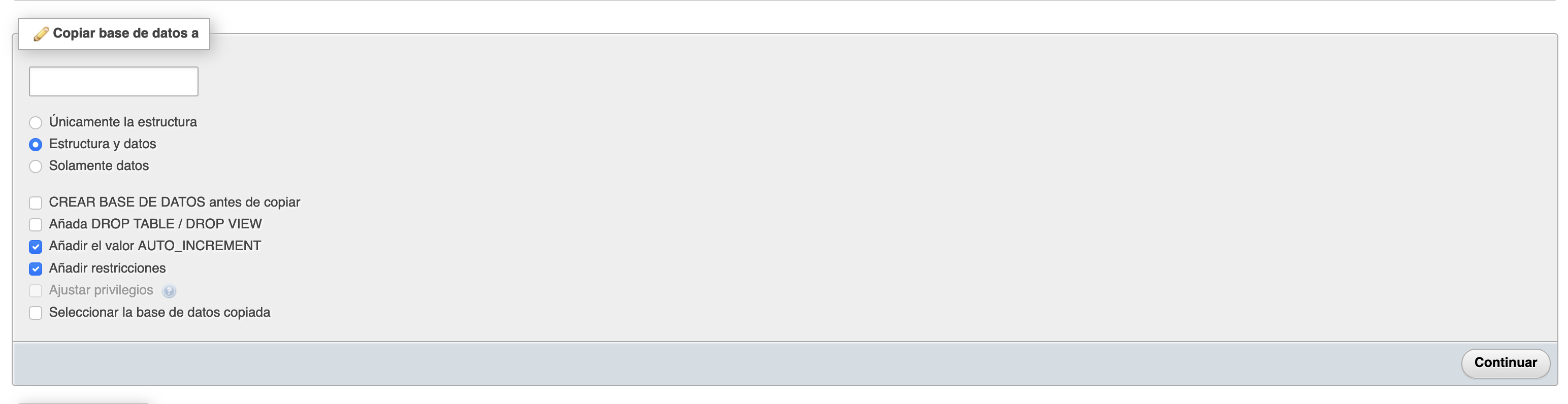
- You will find the "Copy database to" option
- Enter the full name of the database you created, including the account prefix (for example,
usuario_nueva, not justnueva). - Select "Structure and data"
- Untick "CREATE DATABASE before copying" and check the rest: the destination must be empty and you do not need to drop existing tables.
- Check the source and destination names once more, click "Go" and wait for the result.
phpMyAdmin makes this copy within a web request. If the database is large and the process exceeds its time limits, export and import with mysqldump and mysql from the terminal instead of repeating the operation from the browser.
Validate the copy
Check the tables, their counts with COUNT(*) and the objects the application needs, such as views, triggers or routines. Some options depend on your permissions. If the operation fails halfway, do not repeat it over the partial destination without checking it.
Configure the website clone with the new database name, user and password. Turn off emails, payments, webhooks and scheduled tasks that could act on production services. Test logging in, searches and a test write, and confirm the original database has not changed.
You may also find useful
- Convert a MyISAM database to InnoDB by changing the storage engine Convert MyISAM tables to InnoDB on a verified clone, check space, indexes and rows, and keep the ori...
- Create a database and its user with the cPanel wizard Create a MySQL database, its user and the permission assignment from the cPanel wizard to get an app...
- Fix the database connection error in WordPress What to check when WordPress shows Error establishing a database connection after migrating the site...
- Kill running MySQL queries Identify slow or blocked MySQL queries and tell the difference between stopping a statement and clos...
Something wrong or out of date? Tell us and we will review it.