

Security and SSL
Manage a commercial SSL certificate
Go to SSL certificates to see the commercial certificates ordered separately. This section is not the status of the AutoSSL included with a hosting service: to diagnose the certificate served by a domain, use Hosting > Delivery and certificates.
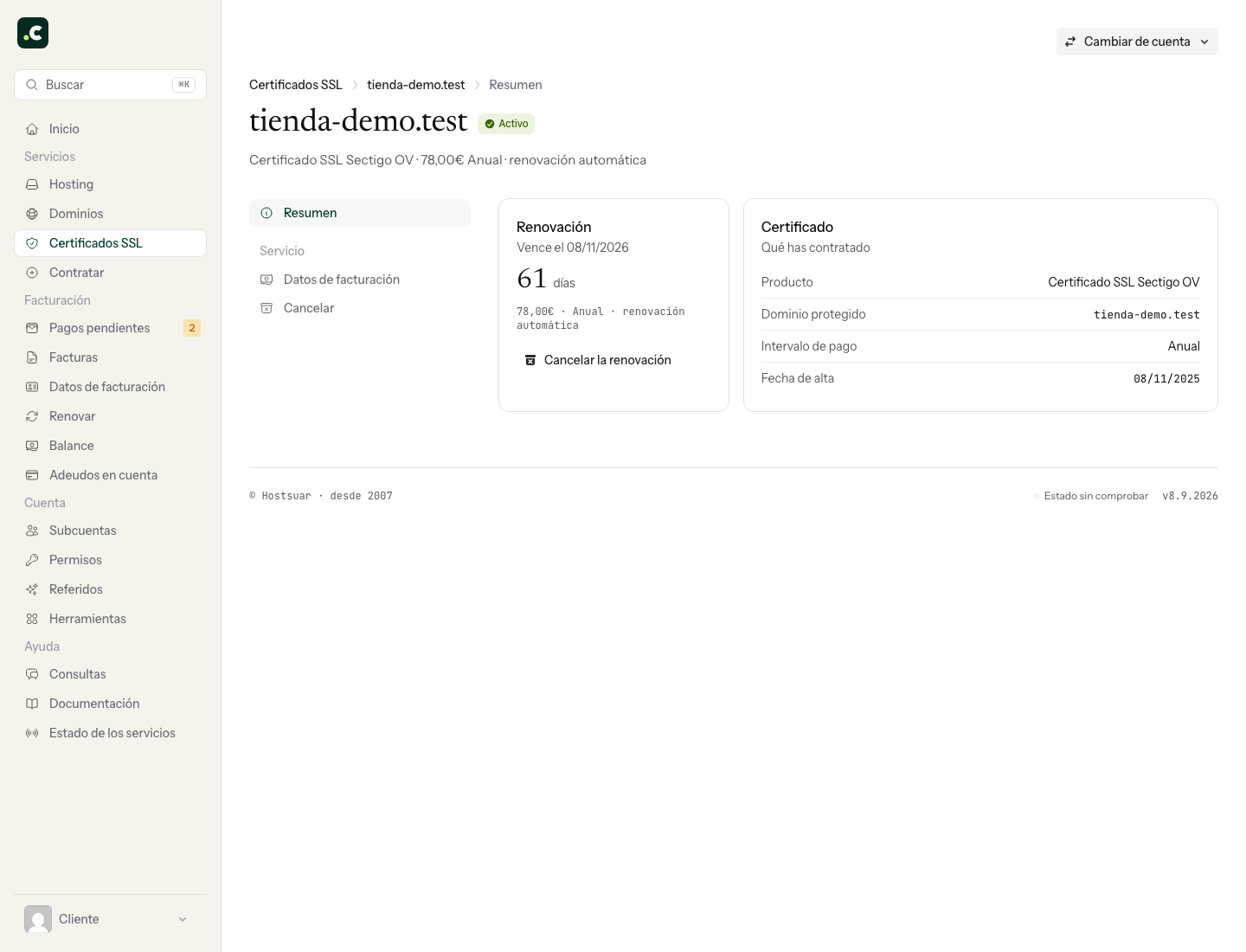
Check the certificate
Open its page to review:
- the product ordered;
- the protected domain;
- the service status;
- the activation and due dates;
- the price and billing interval;
- whether automatic renewal is on.
The number of days refers to the renewal of the commercial service. It does not replace a public check of the certificate the website is serving.
Billing
In Billing details you can choose the profile and, where applicable, the associated bank account. Make the change before the next proforma invoice is generated so that it applies to the upcoming renewal.
Cancel or reactivate the renewal
Click Cancel the renewal if you do not want to renew the certificate. The page will show the scheduled cancellation and no new renewal proforma invoice will be issued. Also check the technical expiry of the installed certificate: it may not match the commercial due date.
While the service is still active you can go back in and click Undo the cancellation. Then check that the page shows automatic renewal again. Cancelling this service does not by itself remove other installed certificates or change the website's HTTPS configuration.
Before you stop renewing
Check which certificate will keep serving each name on the domain. If you are switching to AutoSSL, verify that it has been issued and installed and test the website before relying on it. It is not enough for the hosting to include AutoSSL or for you to have cancelled the previous product.
Keep the confirmation of the change and check whether there is already a pending proforma invoice: changing the renewal does not automatically cancel a payment document that has been generated. If it does not match what you expected, contact us before paying it or leaving it pending.
You may also find useful
- AutoSSL notice: the renewal may reduce coverage Explains the reduction of coverage notice, how to find the domain that fails validation and when to...
- Automatic SSL certificates for domains and subdomains Check AutoSSL's free coverage and enable HTTPS on your website once the certificate is valid.
- Diagnose an invalid SSL certificate Tell apart a wrong name, expiry and the chain of trust; check the DNS destination and the AutoSSL st...
- Enable HTTPS in Joomla Explains how to check the certificate and enable HTTPS from Joomla's global configuration without ne...
Something wrong or out of date? Tell us and we will review it.