

Domains and DNS
Redirect a domain without ordering hosting
You can send visits to a domain without hosting to another website from the client area. Open Domains, click Manage next to the name and go to Web and applications > Redirects.
Prepare the DNS
This tool requires the DNS zone to be active and our nameservers. If the domain uses other DNS, first keep a copy of all the records that need to keep working: web, email, verifications, SPF, DKIM and DMARC.
If DNSSEC is in use, coordinate the delegation change. When it needs to be turned off, first remove the DS from the registry, wait for its TTL and then stop signing with the previous provider. Do not switch to an unsigned zone while its DS is still published.
If the domain already has hosting and points to it, set up the redirect in cPanel.
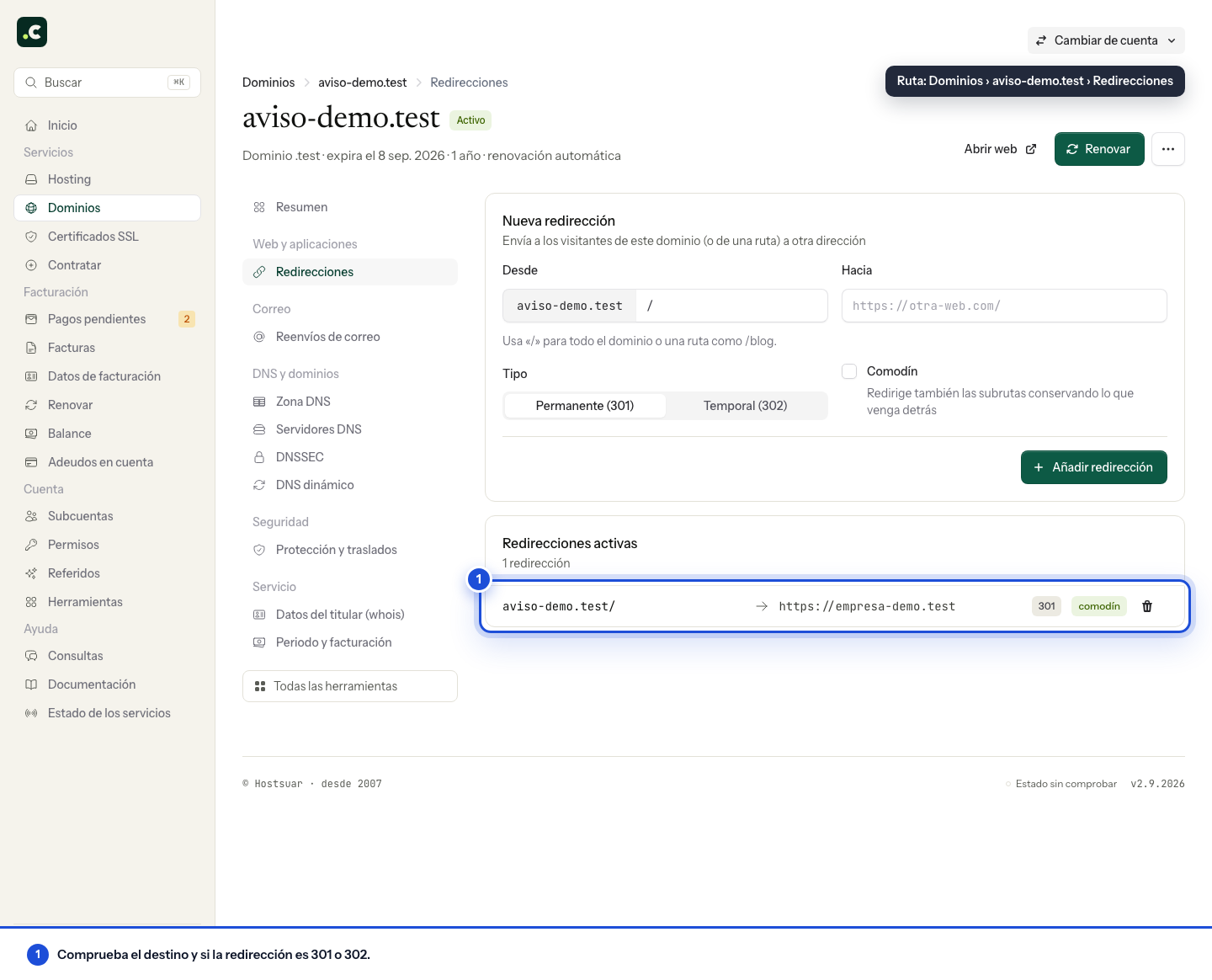
Create the redirect
In New redirect:
- From: the origin path, without repeating the domain. Use
/for the root or/catalogofor that path. - To: the full destination URL, such as
https://example.net/. - Type: 301 for a permanent move or 302 for a temporary one. While testing, start with 302.
- Wildcard: keeps the path. For example,
/catalogoon the origin domain will be sent to the equivalent path on the destination.
Save and review the list. If the destination does not keep the same URL structure, prepare content-by-content redirects instead of sending every page to the home page.
Check the result
Test the domain with and without www, over HTTP and HTTPS, as well as an internal path. HTTPS access to the origin must first complete its secure connection; the redirect does not fix an invalid certificate.
Also check email if you have changed the nameservers. If the redirect fails, confirm where the domain resolves before creating another rule. To remove it, delete the relevant entry and test again, bearing the browser cache in mind.
This tool directs visits; it does not copy files or host the destination's content. You still need to renew the domain's registration.
You may also find useful
- Choose the www or non-www version and redirect the other Set up a 301 redirect between the www and non-www versions, keep paths with a wildcard and order the...
- Create and test a redirect in cPanel Explains the cPanel options for choosing 301 or 302, applying the change with or without www and kee...
- Load another website in an iframe Shows how to load another website inside an iframe while keeping the visible domain, which file to c...
- Change DNS with minimal disruption to your website and email How to prepare the DNS zone, sync the latest changes and move a website and its email to the new hos...
Something wrong or out of date? Tell us and we will review it.